

 Tiếng Việt
Open Tracepen Online (free, no install) →
Tracepen is a free online image vectorizer that turns a raster image (PNG, JPG, WebP) into clean vectors in your browser – export SVG, PNG, PDF, or DXF (Lines, Hatch, Faces) for Figma, Cricut, Lightburn, CNC, AutoCAD, SketchUp, or Blender. A deterministic tracer (no AI). Free with every feature at full colour and in every format, a few exports a day with a free 3dshouse account – try it online. Tracepen Pro removes the daily limit: $80 one-time, and the same purchase covers the SketchUp plugin and the Blender add-on.
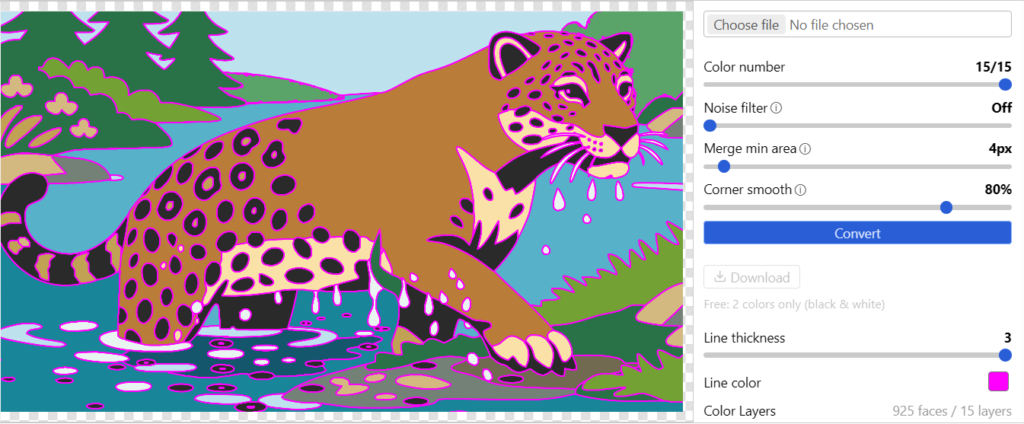
Tracepen Online Image Vectorizer — Video Demo
How to trace an image online, step by step
- Open the app and sign in with a free 3dshouse account (the button opens a browser tab; come back when it is done). On your first visit a strip of sample images sits under the app, so you can try it without hunting for a file.
- Drop in a PNG, JPG or WebP. An image whose longer side passes 1500 px is scaled down first, so every export – SVG, PDF, DXF – lives in that pixel space. The Crop button trims the picture before you convert.
- Read the colour count it proposes. The app analyses the picture, decides whether it is flat artwork or a photo, and sets Color number to the colours it found. Slide it down for fewer layers.
- Tune, then press Convert. Noise filter (0-5), Merge min area (1-64 px) and Corner smooth (sharp to round) are the three knobs. Converting is never counted, so re-run it as often as you like.
- Clean up the layers. Each colour is a swatch with a colour picker and a checkbox. Untick the background swatch and it is left out of every format you export.
- Download and pick SVG, PNG, PDF or one of the three DXF flavours. Each download counts as one export against the free plan’s daily allowance.
Free Online Vectorizer Features
- Six export formats – SVG (Figma, Illustrator, Inkscape, Affinity), PNG, PDF, DXF Lines (Cricut, Lightburn cut, CNC), DXF Hatch (Lightburn fill), DXF Faces (SketchUp).
- Two pipelines, chosen for you. Flat artwork (logos, icons) is quantized straight to your colour count, so the picture’s exact palette survives. A photo first has similar regions merged, then is quantized.
- Colour number 1 is a silhouette mode. Slide it to 1 and Tracepen thresholds brightness at half scale and traces the dark areas as one shape – the quickest route to a stencil or a cut-out.
- Specks are absorbed, not deleted. A region smaller than Merge min area joins the neighbouring colour it shares the longest border with, and a colour never disappears entirely, so a thin outline stays.
- Same input, same output – no AI and no randomness: Wu colour quantization in OKLab, small-region absorption, contour tracing, then Potrace-style Bezier fitting.
What stays on your machine
The tracing runs in a Web Worker as WebAssembly, so the image itself is never sent anywhere. The page still talks to 3dshouse.com for sign-in, the plan check and the daily export count, and it loads Google Analytics like any web page – none of those requests carries your picture. It needs an internet connection to open and to sign in.
Export formats — what is inside each one
| Format | What the file contains | Use it for |
|---|---|---|
| SVG | One path per colour, curves kept as Beziers, holes cut with even-odd fill | Figma, Illustrator, Inkscape, Affinity, Canva, web |
| PNG | The SVG rendered at 1.5x the traced size | Tools without SVG support (Photoshop, PowerPoint, Keynote, Word) |
| One vector page, same look as the SVG | Print layout, slide decks | |
| DXF Lines | Every contour a closed LWPOLYLINE, one DXF layer per colour | Cricut, Silhouette, Lightburn (Cut), AutoCAD, Fusion 360, LibreCAD, CNC |
| DXF Hatch | One solid HATCH per colour, holes by even-odd | Lightburn (Fill / Scan), AutoCAD |
| DXF Faces | Triangulated 3DFACE at Z = 0, one DXF layer per colour | SketchUp import (Blender: use the add-on) |
DXF has no real-world size here: the coordinates are the pixels of the traced image (upright, Y pointing up), so a 1200 px wide trace arrives 1200 units wide – scale it to size after import. DXF curves are polylines: each Bezier is cut into up to 8 straight segments, so zoom in on a big circle in CAD and you will see the facets. The SVG and PDF keep true curves.
SVG and PDF carry a 1 px stroke in each region’s own fill colour, even with Line thickness at 0. It stops neighbouring colours from showing hairline seams in viewers that anti-alias each shape on its own. DXF has no stroke at all, so for cutters and engravers use DXF Lines or Hatch rather than SVG.
Import into your tool
- Figma – skip the SVG: the Tracepen plugin for Figma traces a file or the selected layer and adds the vectors to your canvas, one path per colour.
- Illustrator / Canva / Inkscape / Affinity – open or place the SVG.
- Cricut Design Space / Silhouette Studio – upload DXF Lines. Cricut’s help centre says Design Space does not support DXF in its iOS and Android apps, so upload from a computer, or use the SVG. Colour rides on each DXF layer’s true-colour attribute; how a cutter app treats layers depends on the app, so check the preview after upload and use SVG when the colours matter.
- Lightburn – DXF Lines for cutting (outlines → Cut), DXF Hatch for engraving (filled regions → Fill / Scan). Every Lines contour is written closed, and a shape has to be closed before Lightburn can fill it.
- AutoCAD / Fusion 360 / LibreCAD – DXF Lines for outlines, DXF Hatch for filled regions; every colour becomes its own CAD layer.
- Blender – skip the DXF: the Tracepen add-on creates mesh or Bezier curve objects, one per colour, directly in the scene.
Image to SketchUp: DXF Faces or the plugin
Two routes lead into SketchUp, and SketchUp receives different things.
DXF Faces (this page): download the .dxf and use File → Import. Each region arrives as triangles; tick Merge Coplanar Faces in the import options, which SketchUp’s help describes as removing triangulated lines from planes. DXF layers become tags, and the import options ask for a unit – pick millimetres and one image pixel becomes one millimetre, then scale the group to size.
The SketchUp plugin builds the faces itself, so there is no triangle mesh to merge: a region with holes becomes one face with inner loops, each colour lands as a group with its own material, and you type the width in the model’s own units. Tracing the same image again refills the same component instead of stacking a second copy, and one Ctrl+Z removes the whole insert. It shows this same interface inside SketchUp, so it also needs a connection. Get it from the SketchUp Extension Warehouse, or read the Tracepen SketchUp page first.
How Tracepen compares
| Tool | Cost model | Runs where | DXF output |
|---|---|---|---|
| Tracepen | Free with a daily export limit; Pro $80 one-time | Browser, SketchUp plugin, Blender add-on, Figma plugin | Lines, Hatch, Faces |
| Vector Magic | Online $16.99 / month; desktop $474 one-time | Web or desktop | Desktop edition on PC only (online: EPS, SVG, PDF) |
| Vectorizer.AI | Web app $15.99 / month | Web | Listed among its outputs (SVG, EPS, DXF, PDF, PNG) |
Prices read from each vendor’s pricing page on 2026-09-30; they change, so check before you buy. Vectorizer.AI describes its engine as deep-learning AI; Tracepen is not. Inkscape’s Trace Bitmap is the free desktop option: its tracer descends from Potrace, and its Multiple scans mode creates one object per scan. For a photo run through Illustrator, CorelDRAW, Vector Magic and Tracepen side by side, see the image to vector tool comparison.
Install
Nothing to install – it runs in the browser. Tracepen Pro ($80 one-time) removes the daily export limit, and one purchase covers every surface – web app, SketchUp plugin, Blender add-on and Figma plugin.
Requirements
- A browser that runs WebAssembly and Web Workers, with JavaScript on.
- An internet connection: the page loads from tracepen.3dshouse.com, and sign-in and the daily count go through 3dshouse.com.
FAQ
How do I trace an image online for free?
Open Tracepen, sign in with a free 3dshouse account, drop in the image, press Convert and pick a format under Download. Converting and previewing are unlimited; only the downloads are metered on the free plan.
What does trace bitmap online actually do?
It turns a bitmap – a grid of coloured pixels – into vector paths that scale without blurring. Tracepen groups pixels into colour regions, follows their outlines and fits Bezier curves to them with a Potrace-style fit.
