

 Tiếng Việt
Download Decimify for SketchUp (free .rbz) →
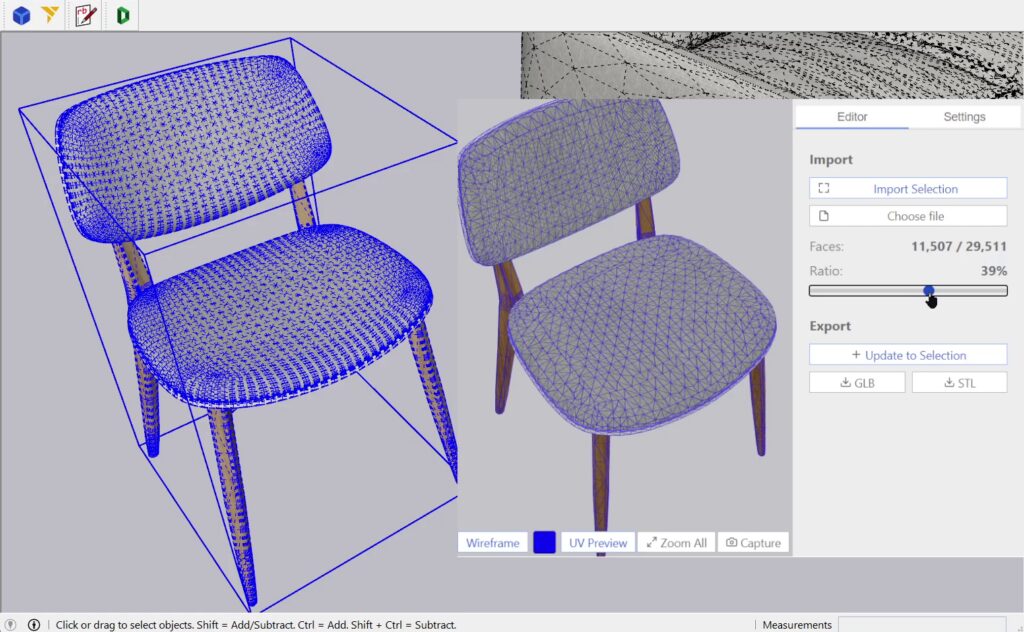
Decimify is a free SketchUp polygon reducer: it rebuilds the mesh inside a Group or Component with fewer triangles, in place, in your own model. Nothing native to SketchUp does that. Soften/Smooth and Hide only change how edges are drawn — the help centre is explicit that softening turns the bounded faces into “a surface entity” and that a hidden edge “remains in your model but disappears from view”. A smooth-looking sofa has exactly as many triangles as the faceted one, and drags the viewport exactly as hard. SketchUp does import and export .glb natively (File > Import, and File > Export > 3D Model → GLTF Binary File), but the only option on that import dialog is Preserve Drawing Origin: nothing in it reduces the mesh you are pulling in.
Video
A heavy model has four different causes — only one is polygon count
Reaching for the wrong cleaner is why “optimising” a SketchUp file so often changes nothing. Name the cause first:
- Too many triangles in geometry you can see — 3D Warehouse furniture, a photogrammetry scan, a supplier’s GLB, a detailed plant. This is polygon count, and it is the only one of the four Decimify fixes.
- Unused definitions dragged in by imports — components, materials and styles nobody placed. The screen looks the same, the file is enormous. Purge Unused strips the definitions nothing references.
- Stray edges, duplicate faces, coplanar splinters — a cleanup problem, not a reduction problem. CleanUp³ erases and merges that debris.
- Oversized textures — resize the images. No geometry tool touches this.
Reducing triangles will not recover a file whose weight is 900 unplaced component definitions. Saying so is what makes the rest of this page worth trusting.
How the reduction actually works
The engine is a Rust crate compiled to WebAssembly; the JavaScript around it only shuttles bytes and draws the result. It runs iterative edge collapse with Quadric Error Metrics (QEM — Garland & Heckbert, SIGGRAPH 1997) on top of Hoppe’s progressive-mesh representation (SIGGRAPH 1996), with a wedge structure added so UV seams survive a collapse. The vertex classifier is a port of meshoptimizer’s collapse tables.
Two consequences you feel immediately:
- The build happens once, all the way to the floor. When your selection loads, Decimify collapses it down to roughly four faces and records every collapse as a reversible split. The instant the progress bar finishes, every reduction level already exists.
- The slider does not re-simplify. Dragging it walks that recorded stream forward or backward — monotonic in both directions, costing a buffer rebuild rather than a new solve. Level 0 is special: it hard-restores the untouched geometry instead of rewinding the stream.
Simplification runs in a pool of Web Workers (hardwareConcurrency - 1, minimum one), each holding its own resident simplifier per sub-mesh, so a multi-object selection builds in parallel.
Your mesh never leaves the machine. The only outbound traffic is the sign-in check, the daily-quota call, a 1×1 GIF funnel beacon and the tool’s own static files — no geometry, no texture bytes, no file is ever uploaded. It is not an offline tool, though: the dialog page itself is served from decimify.3dshouse.com, so opening it needs a connection.
What the percentage actually means
The slider is a target triangle ratio applied per sub-mesh: 60% asks each sub-mesh to keep 40% of its own triangles. It is not a vertex count and not a scene-wide budget — ten objects at 50% get 50% each, not a shared budget. The panel reports the achieved result separately (“Faces: current / original” and “Ratio”), and the two can diverge: sub-meshes with fewer than four faces never enter the simplifier, and a UV-pinned mesh can refuse to collapse at all. Read the achieved ratio, not the thumb position.
Reducing a Group or Component, step by step
- Select exactly one Group or ComponentInstance. Decimify refuses anything else in plain words: “Select one group or component to simplify”, “Select exactly one group or component”, “Selection must be a group or component”, “Selection has no faces”. Loose edges and faces must be grouped first. Groups and components nested inside your selection are read recursively, so a whole assembly counts.
- Open Extensions > Decimify — or the Decimify toolbar — and click Import Selection. Faces are read as polygons with their holes, not pre-triangulated by SketchUp, and front and back materials are carried separately.
- Drag the slider and judge the result in the dialog. Nothing in your model has changed yet.
- Click the take-out button; its label tells you exactly what it will do. Update to Selection refills the definition you imported, in place. Load to Origin creates a fresh definition at the origin for a model you loaded from a file. Update in Model refills that new definition on every later click.
The write-back is where the useful details are:
- Refilling in place is why instances stay linked. Decimify clears and refills the ComponentDefinition itself, so every placement of that component updates at once — reduce one chair and all forty chairs get lighter.
- The whole commit is a single Edit > Undo, however many batches it took.
- It is chunked at about 5,000 triangles per batch on purpose, each batch sized to settle in roughly 100–300 ms, and the root instance is placed before the fill loop starts — SketchUp only repaints at operation boundaries, so you watch geometry arrive instead of staring at a frozen window.
- A model loaded from a file lands under one synthetic root definition named
GLTF_Root(SketchUp appends #1, #2…), with one ComponentDefinition per node of the source hierarchy.
Every setting, and when to touch it
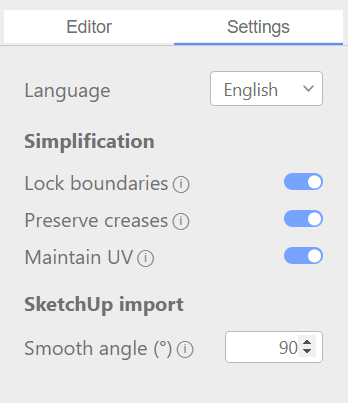
The panel is headed Simplification; the labels below are the ones in the shipped UI, not older names you may see quoted elsewhere.
| Option | Default | What it does, and when to change it |
|---|---|---|
| Lock boundaries | On | Every vertex on an open edge is frozen, and the lock propagates around shared corners. Turn it off for deeper reduction on a closed, watertight mesh; leave it on whenever the object’s outline has to stay exact. |
| Preserve creases | On | Sharp edges get an extra error plane, and any collapse that would leave a fold of 90° or sharper is rejected outright. Turn it off only when you genuinely want a smooth blob — box corners will round off. |
| Maintain UV | On | The one knob that decides whether a textured model reduces at all. See below. |
| Smooth angle (°) | 90 | SketchUp only, applied on the way back in. Interior edges whose two faces open at this angle or wider are set soft and smooth; sharper folds stay hard. Lower the number and more edges soften. Boundary edges are deliberately left visible as silhouettes. |
All four persist between sessions. Note that the edge state of your original model is not read as input — soft/smooth is rebuilt entirely from the Smooth angle value when the geometry is written back, so that value is what your decimated curved surface will shade like.
Maintain UV: the switch behind a slider that “does nothing”
This is the most consequential option, and the failure it causes looks like a broken tool. When a face has UV pinned per corner — most often heavy upholstery modelled in SketchUp, or a textured 3D Warehouse asset — every triangle carries its own UV slot at every shared vertex. With Maintain UV on, the simplifier sees a UV discontinuity at every vertex and refuses to collapse. The slider moves; the face count barely does.
The app will tell you when this is the cause: once slider reduction runs more than 20 points ahead of the achieved reduction, it prints “Maintain UV is limiting reduction — try disabling it in Settings.”
The trade-off, stated as it really is:
- On — the output is texture-identical to the source, and the slider may lock.
- Off — it reduces freely, and UV is reconstructed at render time: each surviving corner’s current position is solved as barycentric coordinates inside its original triangle, so the per-face pattern is preserved with no re-projection needed in SketchUp. Because adjacent faces are solved independently — matching SketchUp’s own per-face projection semantics — thin seams can appear where their corners drift apart.
In the dialog you only have to toggle it: the session rebuilds itself, no re-import. If a model needs both deep reduction and clean textures, the real fix is upstream — re-UV it in Blender, Maya or RizomUV so adjacent faces share UV slots, then bring it back.
Real limits, stated plainly
- The output is triangles — one SketchUp Face per triangle. There is no coplanar merge and nothing is hidden: Decimify softens and smooths interior edges by the Smooth angle rule, which is what makes curved surfaces shade correctly, but a flat area stays split into triangles. Plan for that if you will edit faces afterwards or need quad topology downstream.
- Physically small objects lose faces to SketchUp, not to the algorithm. SketchUp welds vertices within about 1/1024 inch (≈0.001″), so a triangle whose three corners all land inside that tolerance is rejected when the face is created. Screw threads, jewellery, fine lattices: scale the object up, reduce, scale back. Size is the variable here, not reduction level.
- Non-manifold topology is classified, not repaired. Border vertices only collapse into border or locked vertices, seam into seam, and locked vertices collapse into nothing. A messy mesh simply reduces less.
- Per-face-pinned meshes can stall with room left on the slider. The classifier is deliberately conservative, matching meshoptimizer upstream; the code names this an outstanding defect for exactly the heavy-upholstery case.
- Vertex colours are not carried through. UV is the only attribute the simplifier tracks.
- No file-size or triangle limit exists anywhere in the code; the practical ceiling is the memory of the embedded browser window. The dialog interface is English only.
Install the Decimify SketchUp plugin
- In SketchUp: Extensions > Extension Manager > Install Extension, pick the
decimify.rbzfile. - Restart SketchUp. You get an Extensions > Decimify menu item and a Decimify toolbar.
- Sign in with your free 3dshouse account the first time the dialog opens — it hands sign-in to your normal browser and comes back signed in as that account.
Two things worth knowing about updates. The .rbz holds Ruby only: the interface is fetched from decimify.3dshouse.com when the dialog opens, so improvements arrive without reinstalling anything, and a new .rbz is needed only when the Ruby side itself changes. And the extension never installs anything by itself — it compares versions, shows a notice, and a Download button opens the .rbz in your browser.
Requirements
- SketchUp 2022 or newer. Older versions get a message box pointing at the browser version. Two hard reasons for the floor: the dialog bundle targets the Chromium 88 engine that SketchUp 2022 embeds, and bulk face creation uses
Sketchup::EntitiesBuilder. - An internet connection, and a free 3dshouse account.
Plugin or browser — which one do you need?
Both surfaces render the same interface, from the same code. Pick by where the model lives:
- The SketchUp plugin when the heavy geometry is already in your model, or the result has to go back into it. Import Selection, commit-back, the model’s own units and the Smooth angle option exist only here.
- The browser app when you have a GLB or STL file and no reason to open SketchUp — simplify it in a browser tab with the same slider, then download the result.
Import in either surface is GLB and STL. Export is binary GLB (materials and textures) or binary STL (geometry only); there is no USDZ export. One Pro purchase covers both surfaces.
Free vs Pro
Free means every feature at every reduction level — no quality gate, no reduction ceiling. What is metered is take-outs: 3 per UTC day per account, where one take-out is one commit into SketchUp or one file export. Previewing, scrubbing and rebuilding cost nothing. Decimify Pro lifts that meter; nothing else differs between the two.
| Free | Pro | |
|---|---|---|
| Commits / exports a day | 3 (resets at UTC midnight) | Unlimited |
| Reduction level | Any | Any |
| Features, options, formats | All | All |
| Export formats | GLB, STL | GLB, STL |
| Price | Free with a 3dshouse account | $40 one-time |
Pro is attached to your account, not to a licence key or a seat, so it unlocks in a dialog that is already open — no restart, no code to paste.
One purchase covers both surfaces — the SketchUp plugin and the web app. No subscription, no seat limit.
FAQ
How do you reduce polygons in SketchUp?
Group the geometry, select exactly one Group or Component, open Extensions > Decimify, click Import Selection, drag the reduction slider while watching the achieved Faces / Ratio readout, then click the take-out button to write the lighter mesh back into that definition. SketchUp’s own Soften/Smooth and Hide do not remove any faces, so they cannot help here.
Is there a free SketchUp polygon reducer?
Decimify is free with a 3dshouse account: every feature at every reduction level, with 3 commits or exports per UTC day. Previewing and scrubbing the slider are unlimited. Pro removes the daily meter for $40 one-time.
Is Decimify an alternative to Skimp?
They overlap but are not the same scope. Skimp is an import extension that imports, previews and simplifies GLB, USD, SKP, FBX, OBJ, STL, DAE, 3DS, VRML and PLY, and keeps hierarchy, materials, UVs and normals. Decimify imports GLB and STL only, and its centre of gravity is reducing geometry that is already in your model, with the whole commit as one undo step. Decimify is $40 one-time.
Can I reduce polygons online instead of installing a plugin?
Yes. The browser version runs the same interface and the same engine on a GLB or STL file, with no install and no SketchUp needed, and exports binary GLB or STL.
Does reducing polygons make the SketchUp file smaller?
It shrinks the geometry, because there are fewer faces and edges to store. But most oversized .skp files are heavy for a different reason: component, material and style definitions nobody placed. Run Purge Unused first; if that reclaims most of the size, polygon count was never the problem.
