

 Tiếng Việt
Metasheet is a free Revit Excel plugin with two ways to work: export any collection of Revit objects to XLSX, edit it in Excel and import the file back — or skip the file entirely and edit the same data in a spreadsheet grid inside Revit. Every feature is free, no Pro tier; the only gate is signing in with a free 3dshouse account.
⬇ Download free — Revit 2022–2027
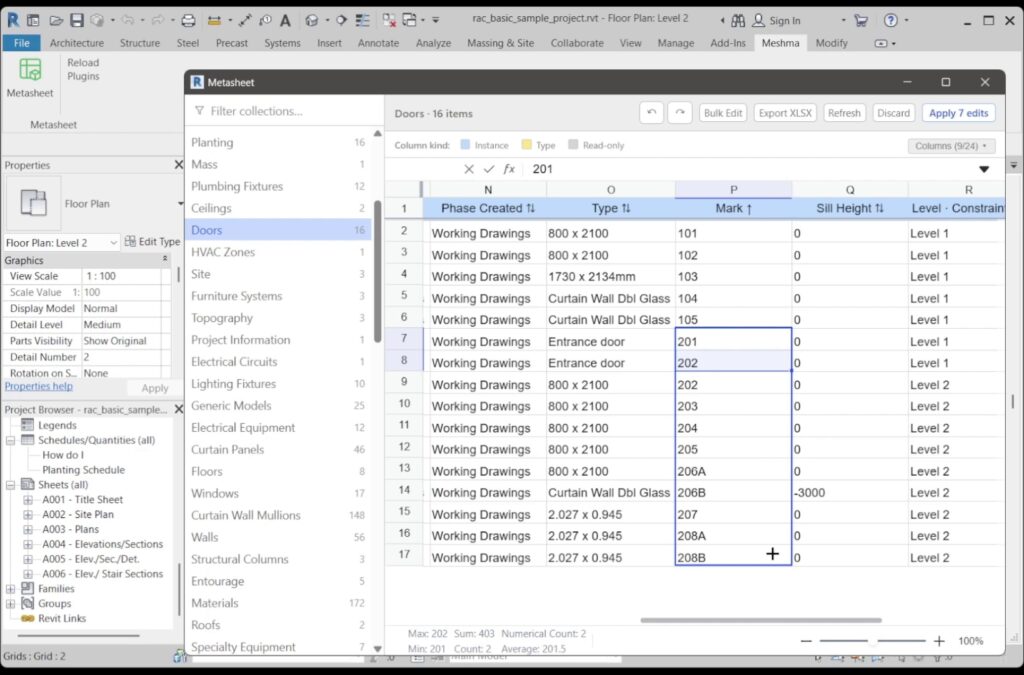
Revit to Excel and back, step by step
- Export XLSX. Pick a collection, click Export XLSX. You get one sheet with the grid’s own headers, a frozen header row and auto-sized columns. It writes the collection as Revit handed it over — not your current sort order, hidden columns or unapplied edits.
- Edit in Excel. Change values, sort, filter, delete the rows you do not care about. Keep the Element ID column — that is what the import matches on.
- Import XLSX. Columns are matched to the grid by header text (case-insensitive), and rows by Element ID rather than row order, so reordering or deleting rows in Excel cannot write a value onto the wrong element. Columns the grid does not have are ignored, and read-only columns are skipped even when the file holds values for them. If no Element ID column survives in the file, the import falls back to row position.
- Apply. Imported values land in the grid as staged edits — nothing reaches the model until you press Apply, which commits the batch in one Revit Transaction. If every value in the file already matches the model, Metasheet tells you so instead of applying nothing.
Or stay out of Excel completely. The grid inside Revit is a real editor, not a preview: type over values, paste a block of cells, drag-fill, sort, filter, run Bulk Find & Replace or Bulk Prefix / Suffix, then Apply. The XLSX file is there for when you want one — for sending data to someone without Revit, or for an edit that is easier with Excel’s own functions.
Features
Pick a collection in the sidebar, type over the values, press Apply. The parts that are hard to find in other Revit spreadsheet plugins come first.
- Type Name and Family Name are editable. In the Revit API these are not Parameters at all — they are the element’s
Nameproperty, which is why most add-ins list them as read-only. Metasheet treats them as their own column kind and writes them throughelement.Name. - Swapping two names in one apply works. Renaming A-101 ↔ A-102, or shifting a whole Sheet Number range up by one, normally fails: Revit rejects the duplicate that exists halfway through the batch. Metasheet detects the collision, renames the affected rows to a temporary placeholder first, then writes the final values. Sheet Number, Sheet Name, Mark, Type Name, Family Name and every named style go through that path.
- The sidebar is built from your open model, not from a fixed list. Every model category that has instances and accepts bound parameters appears automatically, once under “Elements” and once under “Family Types” — including categories nobody hardcoded. Alongside them: Project Information, Drawing Sheets, Views, View Templates, Rooms, Levels, Grids, Scope Boxes, Revisions, Materials, Text Styles, Dimension Styles, Filled Region Types, Line Patterns, and one entry per schedule in the document.
- Column headers are tinted by parameter scope — instance, type, shared, name, read-only — so the classic “why did that edit change every door” confusion is visible before you type, not after.
- Spreadsheet formulas work:
=B2*2,=SUM(B2:B10),=IF(…). Revit receives the calculated result, not the formula text. A reference to another sheet or another workbook is refused with a message rather than silently writing something wrong. - Bulk Find & Replace with an optional regular-expression mode, plus Bulk Prefix / Suffix — both scoped to one column at a time. Prefix and suffix skip empty cells, so blanks do not turn into values.
- XLSX out and back in. Export a collection, edit it in Excel, import the file again: rows are matched by the Element ID column, so reordering or deleting rows in Excel does not scramble the model, and read-only columns in the file are ignored.
- Empty and read-only columns are hidden on load, and empty ones are pushed to the end — a category carrying 200 parameters opens showing the handful that actually hold data. Any column can be switched back on from the Columns dropdown.
- Copy, paste (including multi-cell), cut, drag-fill, click a header to sort, a row filter with a live “N / total” count, and undo/redo in the grid.
- Staged edits survive switching collections — the sidebar carries a red count badge — and the Apply button shows both the current and the total count, e.g. “Apply 3 edits (17 total)”.
What Apply does, and what Undo does not
Apply opens one Revit Transaction named “Metasheet bulk edit” and writes every staged change inside it, so a single Ctrl+Z in Revit backs the whole batch out as one step. Two details are worth knowing. The Undo arrows inside the Metasheet window only walk the grid’s own history — they never roll back something already written to the model. And Revit refusing an individual cell (a locked parameter, a duplicate value, a validation reject) does not abort the batch: those cells come back as a listed failure while everything else commits. Only a document-level error rolls the transaction back. After each Apply the collection reloads from Revit, so anything Revit recalculated on its own is immediately visible.
How a value actually reaches Revit
Numeric writes go through Revit’s own text parser first, which means you can type 200 mm or 8'-0" into a length cell and Revit converts it using the project’s unit settings; only if that fails does Metasheet write a raw internal value. Read-only numbers such as Area, Volume or a computed width arrive pre-formatted and stay display-only. This is also where the word “formula” splits in two: a parameter whose value is driven by a formula inside the family is locked by Revit itself, and no add-in can write to it — you change the formula in the Family Editor, not the cell.
Limits worth knowing before you start
- The grid mirrors the model. You can change values, but not add or delete rows and columns — new elements belong to Revit’s own tools, new columns to Project or Shared Parameters.
- Bulk Find & Replace and Prefix / Suffix only touch rows currently passing the row filter. Clear the filter when you mean the whole collection.
- Export writes the collection as Revit handed it over — not your current sort order, hidden columns or unapplied edits.
- A schedule row that groups several elements instead of itemising them cannot be written; Metasheet says so and points you at the Elements or Family Types collection.
- Family Name is renamed per family, not per row, so two rows of the same family asking for different names both fail. System families — walls, floors, roofs — keep that column read-only because Revit does not allow the rename at all.
- Pasting into a read-only cell looks like it worked, but the value is dropped at Apply time.
- The interface is English only.
Weighing it against the others: Ideate BIMLink lists at US$795 a year for a single standalone licence (September 2026), and DiRoots SheetLink is free but works by exporting to Excel or Google Sheets and importing the file back. Metasheet’s difference is that the grid is the editor — the spreadsheet trip is an option, not the mechanism. The comparison of Revit spreadsheet plugins lines the tools up side by side.
Install
- Run the installer. It installs per user — no administrator prompt.
- Open Revit: Add-Ins tab → Metasheet panel → Metasheet.
- Sign in with your free 3dshouse account, pick a collection, start editing.
Two things the installer does that are worth knowing afterwards. It writes one .addin manifest into the Addins folder of every Revit 2022–2027 it finds, each pointing at the build for that version’s runtime — so if you install a newer Revit later, run the installer again. And the interface is not inside the MSI: the add-in loads it from metasheet.3dshouse.com each time the window opens, which is why new features arrive without a reinstall and why the first launch needs an internet connection. In the window, F5 reloads it; F1 on the ribbon button opens this page.
Requirements
- Revit 2022, 2023, 2024, 2025, 2026 or 2027.
- Windows 10 or 11, 64-bit.
- A free 3dshouse account.
Revit 2021 is not supported, and the reason is structural: Revit 2022 replaced the old ParameterType and UnitType enums with ForgeTypeId, and one binary cannot serve both sides of that change. The same split runs through the whole range — Revit 2022–2024 run add-ins on .NET Framework 4.8, Revit 2025–2026 on .NET 8, and Revit 2027 on .NET 10 — so Metasheet ships three builds and the installer drops the matching one into each year’s folder. If you ever place .addin files by hand, note that Revit 2027 also moved the all-user add-in folder from C:\ProgramData\Autodesk\Revit\Addins\ to C:\Program Files\Autodesk\Revit\Addins\; a manifest left in the old path simply will not load. Metasheet installs per user, so it is unaffected.
FAQ
Is Metasheet free?
Yes — every feature, no Pro tier, no trial window, no per-seat licence. The only gate is signing in with a free 3dshouse account.
Can I use formulas on Revit parameters?
Yes, in the grid: same-sheet formulas such as =B2*2 or =SUM(B2:B10) evaluate as you would expect and Revit receives the result. That is a different thing from a Revit family formula — when a parameter’s value is driven by a formula inside the family, Revit itself marks it read-only and no add-in can write to it. Change the formula in the Family Editor instead.
Is it an alternative to Ideate BIMLink or DiRoots SheetLink?
For editing parameters in bulk, yes. Metasheet edits in a grid inside Revit instead of exporting and re-importing a file, and it renames Type Name and Family Name, which parameter-based tools cannot reach. It still exports and imports XLSX when you want a file. Ideate BIMLink is a commercial product at US$795 a year for a single standalone licence (September 2026); Metasheet is free.
Which Revit versions does the plug-in support?
Revit 2022 through Revit 2027, on Windows 10 or 11 64-bit. One installer covers all six years and registers a version-matched build for each. Revit 2021 and older are not supported.
