The SketchUp floor generator most people search for, SDM Tools’ FloorGenerator, was withdrawn by its author and stopped producing depth or gaps in SketchUp 2024 (SketchUcation thread, SketchUp forum thread). Twelve current plugins can replace it, from free grid tools to paid pattern libraries, and the table below puts them side by side on price model, SketchUp versions, real 3D tiles versus texture, patterns and one limit each.
SketchUp floor generator plugins compared
| Plugin | Price model as listed | SketchUp versions listed | Output | Patterns stated | Notable limit |
|---|---|---|---|---|---|
| TileUp (landing) | Free up to 3 uses a day with a 3dshouse account, every feature included | 2022 and newer | Real 3D tiles cut to the face | 179 | Needs an internet connection and a sign-in; no product-catalog links |
| Z5 Floor Generator | $15 on Gumroad, one key for up to 3 devices; license period not stated | 2022-2026 | Real 3D boards | 27 (v3.0.0 release note; the Gumroad text still says 12) | Cuts to irregular or curved faces not stated |
| Floor Generator SKP (archigraphics) | $39.99 on the Extension Warehouse; license type not stated | 2024-2027 | Real 3D, editable | 20 plus a Custom Pattern Manager | Takeoff and curved faces not stated; disable live-sync renderers while generating |
| Custom Ground Wizard (CG Wisdom) | Free edition; PRO $39.90 on the Extension Warehouse, license type not stated | Free 2022-2026; PRO 2023-2027 | Real 3D | Free 2; PRO 9 | Free edition has plain grid and brick bond only; takeoff not stated |
| ACGI Surface | $24, 3-day full trial | 2022-2026 | Real 3D, editable geometry | Straight grids, offset joints, herringbone, chevron, more in Tiles mode (no count) | Quantity panel shows only area and tile count, which the page calls estimates |
| WL-Floor & Wall Generator Pro | $8 on the Extension Warehouse; license type not stated | 2022-2026 | Real 3D | 4 plus a Voronoi stone generator | Listed for one platform only |
| Oob layouts | $19 (was $29) on the vendor page, 30-day trial | Extension Warehouse 2020-2024; vendor page 2014-2023 | Real 3D layouts | Rectangular layouts | No SketchUp 2025 or 2026 stated |
| Splitator (Adebeo) | 7.90 EUR excl. VAT a year, single seat, on the vendor page; the Extension Warehouse shows “Free” | Extension Warehouse 2021-2024; vendor page 2021-2025 | Splits a face into a grid with joints | Grid | No technical support included; annual license behind a listing that reads “Free” |
| Floor Generator (Arjun PV) | Free | 2021-2025 | Real 3D, in a group | Plain layout | Page: irregular polygons and spherical shapes are not adapted properly |
| Tiles generator (Bruno P.) | Free | 2024-2026 | Real 3D wall and floor tiles | Grid | Listed for one platform only |
| Curic Face Array | Gumroad post titled “Now Available for Free” | No versions on the forum announcement; users reported in October and November 2026 that it does not work in SketchUp 2027 | Objects you choose, distributed over a face and trimmed at its boundary | Your own repeat rules (“unlimited pattern combinations”) | You supply the tile or board; installation problems reported in the forum |
| Tilelook for SketchUp | 90 EUR + VAT a year, 14-day trial, account required | See the vendor page | Texture material built from a laying pattern, not geometry | Preset laying patterns | Grout width and color are part of the image; tied to the Tilelook catalog |
| SDM FloorGenerator | Withdrawn | Not available | – | – | No longer distributed |
Prices and versions are as shown on the pages read on 2026-11-18 and change; check the vendor before buying. “Not stated” means the page does not say, not that the plugin cannot do it. Plugins for other jobs are ranked in the 12 best SketchUp plugins for 2026; texture-only tools are compared in SketchUp material plugins compared.
What happened to the old FloorGenerator
A moderator on the SketchUp forum says the plugin was withdrawn after a copyright complaint in 2018 and suggests it fails to load because of Ruby changes over the past decade. On the SketchUcation thread the cause of the complaint is described as not made public, with a moderator reading it as a trademark question and another user pointing to a 3ds Max plugin of the same name. In the SketchUp forum thread, users in June to August 2024 report generated flooring with no depth or gap in SketchUp 2024. The replies suggest Oob (paid, “not quite as good” but it does the job), Curic Face Array and Custom Ground Wizard (both free, less varied), or keeping an older SketchUp installed for those jobs.
Plugin by plugin
TileUp
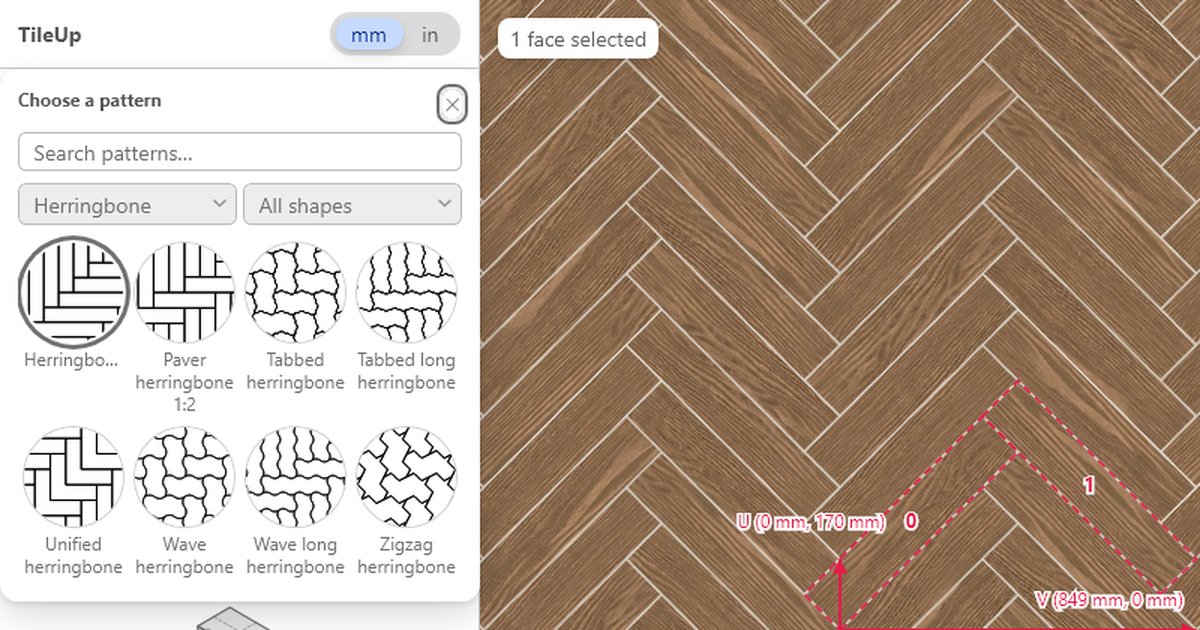
TileUp is the plugin this site makes, so weigh this section accordingly. It turns the faces you select into real 3D tiles: you type the tile Width, Height and Thickness, pick one of 179 laying patterns, set the joints, and the tiles are cut at the edge of the face and around holes. Faces with holes and faces inside nested groups work. Object On Boundaries decides what happens to a tile the edge runs through: Trim cuts it, Inside builds whole tiles only, Overlap keeps the tile whole and lets it hang over. The Horizontal and Vertical joints are lengths in mm or inches, and a negative value makes each tile run on under the next, as in lapped siding. Edge Bevel has a Radius and a number of Segments, a tilt Rotation lets each tile rest on the next like shingles, and a second material can be spread by row, column, random or checkerboard. Quantities lists full and cut tiles, net area, order area and waste, with a CSV export, and the result is one component that stores its settings, so you can change the pattern or joints and press Update, which rebuilds it in one undo step.
It also tiles smooth curved selections such as a cylinder or a gentle dome, with tiles either flat on the surface or bending with it; walls joined at corners are laid as one run so the joints continue around the room. The listings read above do not describe curved selections or the Trim, Inside and Overlap choice (ACGI Surface has a terrain mode that its page calls an approximation). Where it does not stand apart: Z5 also states chamfer and fillet edges with size and segments, and Z5, Oob, Splitator, ACGI Surface and Tilelook state a quantity count of their own. Its limits: SketchUp 2022 or newer only, an internet connection (the dialog loads from 3dshouse servers) and a sign-in, no link from the takeoff to a product catalog, and no seamless texture output; flat textures and PBR maps come from Texturic, a separate extension.
Z5 Floor Generator
Gumroad lists $15 with one key for up to 3 devices; whether that is a single payment or a recurring price is not stated, and the Extension Warehouse page carries no price of its own. It builds real 3D boards with adjustable grout gaps and thickness, chamfer and fillet edges, random rotation and X/Y/Z tilt per board, multi-texture mixing and saved presets. The v3.0.0 release note adds a Start Point mode (a live preview follows the cursor with SketchUp snapping), 15 patterns (12 to 27), an Image Map in which a grayscale image drives tile scale, height, density and materials, and a Material CALC with area, tile counts, loss percentage, boxes and cost per unit, exported as HTML or PNG. The listing does not say how it handles irregular or curved faces.
Floor Generator SKP (MultiTexture Support)
Listed at $39.99, license type not stated, for SketchUp 2024 to 2027. True 3D geometry that stays editable after generation, 20 named patterns plus a Custom Pattern Manager, board chamfering, wavy edges, multi-texture with a texture atlas and pack manager, a mosaic that maps each board to the nearest color of an image, and Automatic Tile Trim for wall edges when generating on several faces. Takeoff and curved faces are not mentioned. The page asks you to disable real-time renderers with live sync before generating, because their observers slow the generation.
Custom Ground Wizard (Free and PRO)
The Free edition is a real 3D generator with tile size, grout width and depth, a bevel and control of where the first full tile lands (select the face plus one or two reference edges, rotate the grid to any angle), limited to plain grid and brick bond; herringbone, hexagon and random texture shifts are PRO. The PRO edition is $39.90 on the Extension Warehouse (license type not stated), adds herringbone, chevron, hexagon, corset, fish scale, cube and arrow for nine patterns in total, random texture offset and rotation per tile, and handles concave outlines and inner holes on any flat face, sloped and vertical included. A takeoff is not mentioned.
ACGI Surface
$24 with a 3-day full trial. Editable surface geometry with grout, thickness, rotation, offsets, a start corner and trimming to boundaries and openings, and an Update that regenerates a selected output with changed settings. A terrain mode places each tile as a rigid piece, which the page itself calls an approximation: gaps, steps and overlaps can remain on steep slopes. The quantity panel and CSV export show only combined area and number of tiles, described as estimates. The same plugin also lists photo mosaic, fluted and louvre details and CNC cutouts; its stone modes are marked Coming Soon.
WL-Floor & Wall Generator Pro
$8, listed for one platform only. Parametric 3D grid, brick, basketweave and hexagonal patterns with length, width, grout and thickness, a pinned origin, rotation and micro offsets, and a Voronoi stone generator (20 to 300 pieces, adjustable irregularity).
Oob layouts
Extension Warehouse: 3D layouts for paving, siding, flooring and tiling, surfaces and quantities with cut parts, random lengths, widths and thicknesses, and multi-layer layouts, with a 30-day trial. The vendor page shows $19 (was $29, a limited offer) and compatibility from SketchUp 2014 to 2023; the Extension Warehouse lists 2020 to 2024, and neither page states SketchUp 2025 or 2026. Only rectangular patterns are stated.
Splitator
Splits a face into a grid of faces with joints and angles and counts tiles, pieces to cut and total area. The vendor sells a single-seat annual license at 7.90 EUR excluding VAT for SketchUp Pro 2021 to 2025, with no technical support included; the Extension Warehouse listing says “Free” and stops at 2024. The original poster of the 2024 forum thread objected to exactly that: listed as free, but paid with no trial.
Floor Generator by Arjun PV, Tiles generator by Bruno P. and Curic Face Array
Arjun PV is free for SketchUp 2021 to 2025: you create the surface, enter the flooring values, and the flooring is generated in a group. Its known issues say irregular polygons and spherical shapes are not adapted properly; it is a different plugin from the old SDM one. Bruno P. is free for SketchUp 2024 to 2026 and builds 3D wall and floor tiles, detecting holes such as doors and windows. Curic Face Array (announced 16 September 2024) is a different kind of tool: you pick the objects, it distributes them over a face with boundary trimming and your own repeat rules, so it lays tiles or boards you modeled yourself; the announcement describes repeat rules rather than a pattern library. Forum users reported installation trouble in 2025 and that it does not work in SketchUp 2027.
Tilelook for SketchUp
Tilelook builds a texture material around a laying pattern: you choose a pattern, fill its slots with products from the Tilelook catalog (the page cites about 200,000 products), and set grout width and color, repetition in the preview and resolution with an estimated file size. It needs an account and costs 90 EUR + VAT a year after a 14-day trial, and it can generate a quantity takeoff. The result is a texture, so grout is image content rather than geometry. Choose it for a catalog-tied material, not for modeled tiles.
How to choose
- Replacing the old FloorGenerator look (real tiles with a grout gap and depth): Z5, Floor Generator SKP, Custom Ground Wizard PRO, Oob or TileUp.
- No budget: Custom Ground Wizard Free for plain grid and brick bond with a bevel; Arjun PV or Bruno P. for a simple grid; Curic Face Array if you already have the tile model. TileUp has every feature at 3 uses a day.
- Lowest paid price: WL-Floor & Wall Generator Pro at $8, then Z5 at $15.
- Most patterns: TileUp states 179; the highest competitor count in the pages read is Z5 with 27.
- Curved surfaces: TileUp states a curved-faces option; the other listings do not mention it, and ACGI Surface describes its terrain mode as an approximation.
- Ordering material: Z5 states loss percentage, boxes and cost; Tilelook links to products; TileUp lists full and cut tiles, areas and waste with a CSV; Oob, Splitator and ACGI Surface also count.
- SketchUp 2021 or older: Splitator (2021), Arjun PV (2021) or Oob (2020). TileUp starts at 2022.
- A texture with a catalog, not modeled tiles: Tilelook. For a seamless texture from the same patterns as TileUp, Texturic.
Tiling a floor without a plugin
A plugin earns its place once the layout goes beyond a plain grid, needs bevels, or must be cut at the boundary. For a simple floor, SketchUp forum and SketchUcation users describe two plain methods:
- A seamless tile texture: scale the image in the Materials browser to the real tile size and align it with Texture > Position (SketchUcation thread). Grout lives in the image: a poster in another forum thread found that a texture lost the grout lines, and a reply notes that renderers often do not show SketchUp edges.
- A hand-built tile component: draw one tile at its exact size, copy it by tile size plus joint (12 in tiles with 1/4 in joints move 12.25 in per copy), copy the row across the floor, and move the floor group to minimize cuts. In the same SketchUcation thread the tile count is floor area divided by one tile’s area plus about 10% for losses, and the area of faces sharing one material appears in Entity Info. Tiles sunk into the floor flicker because two faces sit in the same place; place them on top of the floor instead (forum thread). To read the floor area first, see finding floor and wall area.
FAQ
Is there a free download of the SDM Floor Generator for SketchUp?
No. Forum posts say the author withdrew it and that it is no longer available on SketchUcation (SketchUcation thread). Free options that are still listed are Custom Ground Wizard Free, Floor Generator by Arjun PV, Tiles generator by Bruno P. and Curic Face Array; see the table for their limits.
Does Floor Generator work in SketchUp 2024, 2025 or 2026?
Not as a maintained product. Users on the SketchUp forum reported between June and August 2024 that its flooring came out with no depth or gap in SketchUp 2024 (forum thread), and a reply there dates the withdrawal to a 2018 copyright complaint. One user suggests keeping an older SketchUp installed for such jobs. The plugins in the table list their own supported versions; TileUp supports SketchUp 2022 and newer.
Is there a free floor generator plugin for SketchUp?
Yes: Custom Ground Wizard Free (plain grid and brick bond, with bevel), Floor Generator by Arjun PV (plain layout, no irregular polygons) and Tiles generator by Bruno P. (grid) are listed free, and Curic Face Array is announced as free. TileUp has every feature at 3 free uses a day with a 3dshouse account.
Free: limited to 3 uses a day
Pro: unlimited, guaranteed to work, priority support
- BevelUp — round or chamfer edges into real geometry, in one click
- Decimify — reduce the polygon count of a heavy model
- Tracepen — trace an image into SketchUp faces
- TileUp — turn a face into real 3D tiles, with a takeoff
- Texturic — make seamless tile textures with PBR maps
- SheetUp — turn a SketchUp model into a bill of quantities and cost estimate
- PatchUp — build one smooth surface from curves and edges
- Regionify — turn selected edges into flat faces, holes included