

 Tiếng Việt
SketchUp
12 SketchUp Extensions You’ll Actually Keep Installed in 2026 (Free and Paid)

If you want to improve your qualifications, to work faster to save time when using Sketchup. You have to master the basic tools as well as the best SketchUp extensions and plugins.
In this topic, 3dhouse are glad to share with you “12 coolest plugins for Sketchup”
A quick note before the list: SketchUp has been subscription-only since 4 November 2020, when Trimble stopped selling the perpetual Classic licence (existing Classic licences keep running). You now buy SketchUp Go, Pro or Studio and sign in with a Trimble ID, and the current desktop line is SketchUp 2026. This matters for extensions: the Ruby inside SketchUp has moved on (2.2.4 in SketchUp 2017, 2.5.1 in 2019, 2.7 in 2021, 3.2.2 since 2024), so an old .rbz still installs through Extension Manager but code written for old Ruby, or shipping native binaries or an outdated LibFredo6, can fail to load. Grab the newest build after a major SketchUp upgrade rather than reusing last year’s installer.
Top SketchUp Modeling Extensions & Plugins to Boost Your Workflow in 2026
1. 3dshouse_dynamic Plugin:
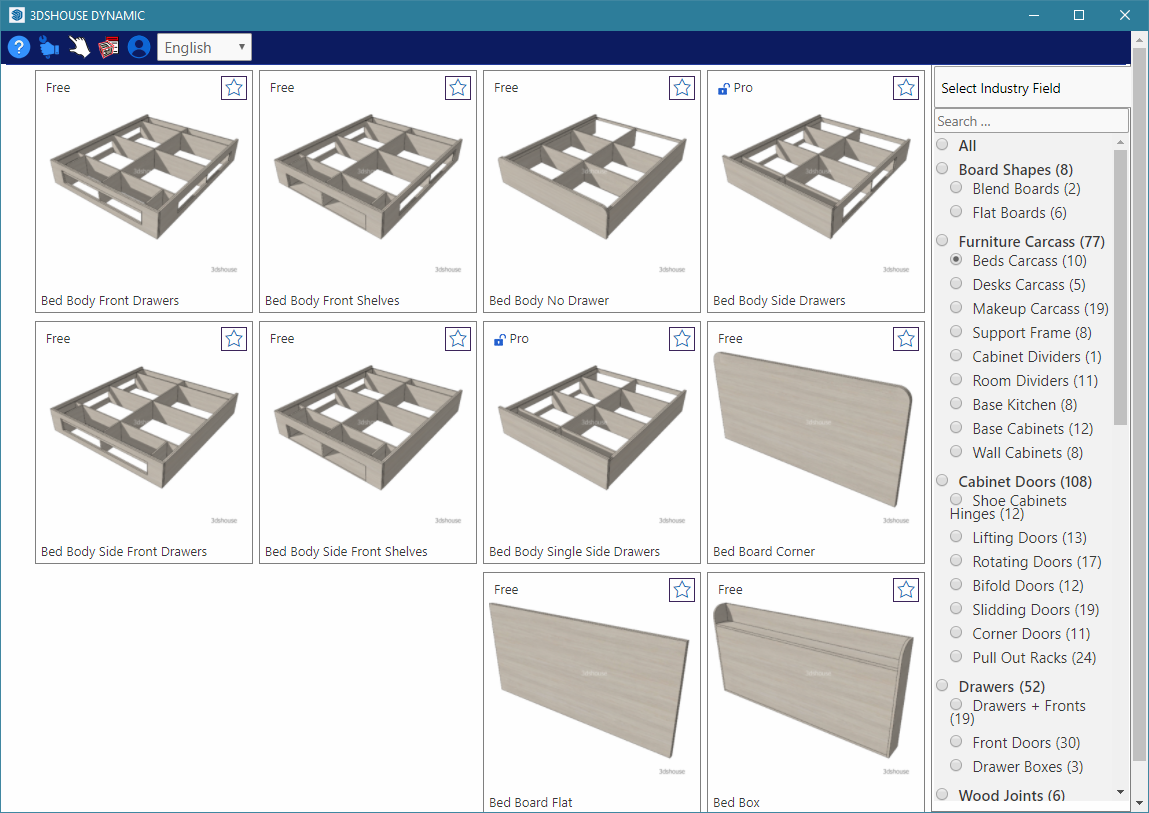
The free 3house Dynamic Sketchup plugin includes hundreds of dynamic Sketchup model and tool set for allows fast and precise woodwork design.
The model library includes furniture parts and details such as doors, drawers, racks … with high flexibility which allows you to customize quickly and precisely to fit with your design.
All the models are stored on cloud to be frequently upgraded, so you can always access the library via the Internet. Because the geometry is streamed from the server rather than baked into a fixed .skp, a parameter you change once (a cabinet width, a door style) updates everywhere it is reused — and new templates appear in your panel without reinstalling the extension.
- Dynamic bed library
- Newest bed models collection
- Can be customized as needed
- Easy to adjust and change

3dhouse dynamic plugin – Bed Fied
Dynamic door library
- Newest door models collection
- Can be customized as needed
- Easy to adjust and change3dhouse dynamic plugin – Cabinet doorDynamic Makeup Cabinet library
- Newest vanity models collection
- Can be customized as needed
- Easy to adjust and change
3dhouse dynamic plugin – Makeup carcass
 3dhouse dynamic plugin – Cabinet doorDynamic Makeup Cabinet library
Dynamic cabinet library
- Newest cabinet models collection: L-shaped, etc.
- Can be customized as needed
- Easy to adjust and change
3dhouse dynamic plugin – Cabinet

… And there are many models, available library templates that are always updated and changed.
You can visit the link to watch more videos about how to install here.
2. 1001 bit pro plugin
As the name suggests, this plugin is quite simple to use but has a very “pro” effect. If before, Sketchup’s basic tools were limited to snapping, aligning, zooming in and out of coordinates… then 100 bit pro was born to help you do that. 1001bit ships in two editions: a free Freeware version on the Extension Warehouse, and the paid Pro version (about US$48) that adds the parametric architectural generators below — so test the free one first before paying.
Some outstanding features of 1001 bit pro:
- Aligns 2 matching objects. (Align command wall in AutoCaD)
- Push block according to the object’s projection onto another object
- Create a spiral plane
- Round / chamfer the corners of 2 straight lines according to the desired parameters.
- Advanced offset: offset by edge
- Create a line that cuts across the object without having to use another plane to cross it to create an intersection.
- Draw a spiral.
- Enlarge, reduce objects according to the origin; X-Y-Z . axis
- Advanced Array: line, column-row,
- Both rotate and copy advanced: the axis of rotation can be a straight line or a circle, a spiral, a contour of any shape.
- Build a 1-layer or 2-layer wall faster than the Push/Pull tool
- Create multiple slots at the same time……
1001bit pro Create grooves on faces 1001bit pro Create columns 1001bit pro Create window frame 1001bit pro Create staircase


3. Floor Generator Plugin for SketchUp
This plugin helps users to create any material surface suitable for common materials such as wood, ceramic tile, fired brick… The advantage of this extension helps you create beautiful display material maps and clearer than bum map or normal map in Sketchup.
- You just need to choose the type of material and the shape of the material you want to map
- The shapes can be square, rectangular, symmetrical, herringbone, hexagonal, diamond…
- In addition, you can customize the profile of the tile and wood tiling according to your preferences
A gotcha worth knowing: the tool generates real edges and faces for every tile, so a large floor can add tens of thousands of polygons very quickly. Build the pattern as a small group and tile it by copying, or hide the edges, otherwise navigation in a furnished room scene gets sluggish.

If you want the pattern as real 3D tiles with a take-off, TileUp builds them from a selected face (herringbone, chevron, brick bonds and 100+ more) and shares the uncut tiles as component instances, which keeps the polygon count down.
4. Round corner plugin
Sketchup users will no longer have to worry about creating bo edges in the group, the bo edges are the intersection of 2 planes with the Round corner plugin. It saves a lot of time for chamfering than doing it manually in sketchup.
Edge modes shown as shown in the figure include:
- Bound the edge with the intersection is a circular arc
- Bound edge with intersection is angle
- Chamfered
- In addition, this extension also supports curved edges
Rounding always multiplies face count, and the curved segments come in soft+smooth so the bevel reads as a single rounded surface. Apply it as the very last step on finished geometry — once an edge is rounded the original sharp corner is gone, and re-rounding an already-rounded edge produces tangled geometry rather than a cleaner radius.

Round corner Types

5. Curviloft Plugin :
This plugin helps sketchup users to create planes drawn by any curves.
- Create any face extrude by curves
- Follow me‘s more advanced option with multiple profiles simultaneously
- Create any planes by closed plines
Curviloft is a Fredo6 tool, so it will not appear in your toolbars until the shared LibFredo6 library is installed and SketchUp is restarted — this is the single most common reason people think the install “failed”. The current builds are signed for SketchUp 2026; if it loaded fine in an older version but stopped after an upgrade, update LibFredo6 first, not Curviloft.

Curviloft spline


6. Vertex tool Plugin :
This paid plugin makes it possible for users to drag and reposition the mesh in the object in different ways (scale, rotate, move by linear or nolinear).
The Vertex tool is useful for objects created by curves or nonlinear surfaces; objects with very complex shapes such as defects or distorted objects; or objects that cannot be visualized with basic sketchup commands.
Vertex Tools and the SubD plugin (no. 12) are by the same developer, Thomas Thomassen, and are designed to be used together with the free QuadFace Tools: Vertex Tools moves the control cage, SubD smooths it live, and QuadFace keeps the mesh in clean quads. Soft-selection falloff is the feature that sets it apart from SketchUp’s native scale/rotate — dragging one vertex bleeds smoothly into neighbours instead of breaking the surface.

7. Mirror selection Plugin
Có thể nói, Mirror selection này là công cụ bổ sung tuyệt vời khi mà trong Sketchup không có lệnh đối xứng ( thay vì bạn copy và flip along) bạn chỉ cần thực hiện 1 thao tác là xong. Plugin này dùng được cho mọi đối tượng trong sketchup ( đường , mặt , group, component…)
Lưu ý: nếu bạn nhân đối xứng một component rồi muốn sửa cả hai bên cùng lúc, hãy dùng “Flip” trên cùng một định nghĩa component thay vì tạo bản sao độc lập — bản sao đối xứng sẽ thành component riêng và sửa bên này không cập nhật bên kia.

8. Fredo scale Plugin
It can be said, this Mirror selection is a great additional tool when in Sketchup there is no symmetry command (instead of you copy and flip along) you just need to do one operation and you’re done.
This plugin has many options, but “Stretching” mode is still the most used because it is very useful for existing furniture models that do not fit the required size, you can change the size without changing the size. change the scale of other components. The Stretching (FFD) mode is what native Scale can’t do: it moves only the rows of geometry inside the box you draw, so you can lengthen a sofa or a cabinet while keeping the cushions, legs and trim at their true proportions instead of squashing the whole thing. Like Curviloft, it needs LibFredo6 installed.

9.Make face Plugin
Creating planes will become faster than ever, especially when you import from AutoCAD through Sketchup, “patching” the strokes to create a plane takes a lot of time.
Thanks to the Make face Plugin, you only need to scan the area to be soldered and we have planes created very quickly without drawing any more strokes.
It only fills outlines that are genuinely closed and coplanar — the usual reason a face refuses to form on imported CAD is a tiny gap or a line sitting a fraction off the plane. Import DWGs at full scale (small SketchUp geometry falls under the internal tolerance and edges merge), and run a “close gaps” / dedupe pass before Make Face if loops stay empty. It also needs the linework to already be in the model — when the outline you want exists only as a logo or flat pattern image (PNG/JPG), trace it into native SketchUp faces first with Tracepen (installs from the Extension Warehouse).

10. Solar North plugin:
This is a plugin to change the direction of shadows in SketchUp. If you have used the default tool available in Sketchup -Show / Hide shadow to change the angle of the shadow, you will know the limitations of this tool when the angle of the Sun is fixed.
Now, with the Solar North plugin, you can easily rotate the North direction of the file you are working on without having to rotate the whole model. Solar North is a free, officially-signed extension from the SketchUp team itself (not a third party), so it installs cleanly on the 2026 line. The key advantage over rotating the model is that SketchUp’s preset axis views still line up with your building, and you can store different north angles per scene for a shadow study at several orientations.

11. Window builder Plugin
This plugin helps you create door types quickly without downloading and editing online libraries. Your job is to choose the type of door, and customize its parameters.
There are many types of typical doors in architecture. The parameters of the width, height, and thickness of the door frame are linked together. The frame it generates is plain static geometry, not a SketchUp Dynamic Component — so after you place it the parameters are baked in and you edit it like any normal group. If you need a window whose size you can re-drag later, build it from a Dynamic Component or the 3dshouse Dynamic library instead.

12. SubD Plugin — SketchUp Subdivision Extension
SubD helps you to smooth mesh surfaces, divide object mesh surfaces automatically, create folds in subdivided mesh to refine shapes and automatically corner objects.
This plugin combines with quardface plugin and vertex plugin to form a powerful toolkit when blending objects in sketchup.
SubD is parametric: it keeps your low-poly “control cage” alongside the smooth result, so you can keep editing the cage and the subdivided surface updates live, then bake it only when you are done. Its real strength is per-edge crease weighting — push one edge’s weight up and you get a sharp seam in an otherwise soft form, which is how you model rounded furniture, cushions or organic shapes without it turning into a blob. It works best on all-quad meshes, which is why QuadFace Tools and Vertex Tools sit beside it. Baking the subdivision is also what makes the model heavy — a baked SubD surface carries far more faces than the cage you edited, and Decimify brings that count back down on the selected group or component.

