⬇ Download SheetUp for SketchUp (.rbz)
SheetUp is a SketchUp extension that turns a model into a bill of quantities and a cost estimate. It measures every group and component, lets you attach cost lines by tag, material or component name, and shows the result in five report views (Component, Cost Summary, Cost Detail, Material and Profile) that export to XLSX, CSV or HTML. The quantities come from the model’s geometry; every unit cost comes from you. Generating, viewing and costing are not limited, and you get 3 free exports per UTC day with a free 3dshouse account.
What SheetUp measures in a SketchUp model
Generate BOQ scans the whole model, including nested groups and components. Each group or component that has faces of its own becomes one row, keyed by tag and name; a container that only holds other objects gets no row, its contents do. The Component Report lists for every row:
- Tag, Container and Component Name. The default tag is shown as Untagged, Container is the name of the parent, a component is listed under its definition name, and a group with no name is listed as Group, so name your groups before you generate.
- Count of instances with that tag and name.
- Width, Height and Length. The bounding-box dimensions of the item at its placed scale, sorted from smallest (Width, usually the thickness) to largest (Length). A rotated component reports the same dimensions as an unrotated one.
- Total Length. Length multiplied by the count.
- Proj. Area. The two larger dimensions multiplied (Height x Length), summed over the instances. It is the area of the largest face of the bounding box, not of the real faces.
- Surface Area. The sum of all faces at the placed scale, including scaled and mirrored components.
- Volume and Weight. Volume of closed solids, and weight from a density looked up by material name. See the limits below.
- Total Cost from the cost lines that apply to the row.
Materials are totalled by name as number of faces and area. A face with no material of its own takes the material of the nearest painted parent group or component, otherwise it is counted as Not Assigned.
From tags and materials to cost lines
Under Cost Data in the sidebar you add cost lines to Tag Costs, Material Costs, Object Costs (a component or group name) and Model Costs (one fixed amount for the whole model, for example preliminaries or a lump-sum credit, with its own tax rate). A cost line has a Code, Description, Input (Count, Length, Area, Surface Area, Volume or Weight), Factor, Unit, Unit Cost, Waste % and Tax %. The same arithmetic runs in every view:
quantity = measure x factorline cost = quantity x unit cost x (1 + waste / 100), before taxtotal = line cost x (1 + tax / 100)
The factor scales the measured quantity before pricing, for example kilograms of reinforcement per cubic metre of concrete. A worked example, arithmetic only: a tag Walls – Exterior measures 120 m² of projected area, with Input Area, Factor 1, Unit Cost 85, Waste 5 % and Tax 10 %. Quantity is 120 x 1 = 120; line cost is 120 x 85 x 1.05 = 10,710.00; total is 10,710.00 x 1.10 = 11,781.00.
Tag and object lines price the items in the Component Report, the Cost Detail and the Cost Summary. Material lines can count faces or use area, and they are priced in the Material Report only. The grand total is the sum of the Cost Summary Total Cost column: tag lines, object lines and the model cost. Material lines are not added to it, so use them for a material take-off and use tag or object lines for the priced estimate. A tag with no cost lines still appears in the Cost Summary as a count line (unit nr) at zero cost, so an unpriced item shows up instead of going missing.
Costs can be typed in or imported: Import Costs reads an .xlsx file with the sheets Tag Costs, Material Costs and Object Costs, and Template downloads a blank file with the column layout and sample rows. Rows whose Input is not count, length, area, surface, volume or weight are skipped, and the number skipped is shown. Cost lines and settings are saved in the SketchUp model file, one undo step per edit, so they travel with the model. Unit costs are stored per metric unit (m, m², m³, kg); with imperial display the cost dialog shows and accepts costs per ft, ft², ft³ or lb and converts.
The five report views
- Component Report. One row per tag and name with the quantities above and its Total Cost.
- Cost Summary. One row per cost line (Code, Description, Quantity, Unit, Unit Cost, Waste%, Tax%, Total Cost), summed per tag or component name, plus the model cost. Its Total Cost column adds up to the grand total, which the status bar and the HTML export header also show.
- Cost Detail. One row per item and cost line: Code, Description, Component, Count, Input, Factor, Quantity, Unit, Unit Cost, Waste%, Tax%, Line Cost and Total Cost.
- Material Report. Material, Faces, Total Area, Unit Cost and Total Cost.
- Profile Report. Slender members only, meaning items whose longest side is more than five times the middle side (beams, columns, rails). It shows count, total length, weight per metre (lb/ft in imperial), weight, the effective cost per metre of the lines that apply, and the total cost.
While SketchUp has objects selected, the status bar shows how many entities are selected and what their cost lines add up to.
Units, currency and columns
Settings switches the display between Metric (m, m², m³, kg) and Imperial (ft, ft², ft³, lb), sets 0 to 4 decimals, the currency (USD, EUR, GBP, CAD, AUD, NZD, CHF, SEK, NOK, DKK, JPY or SGD) and the number format (1,234.56 or 1.234,56). Report Setup lists every column of every view with a checkbox; a column you switch off is hidden in the grid and in every export.
Exporting to XLSX, CSV and HTML
- Export XLSX (full report). One workbook with five sheets named Component Report, Cost Summary, Cost Detail, Material Report and Profile Report and a number format per column.
- Export CSV (current view). The view you have open, saved as UTF-8 with a byte-order mark so Excel reads m², m³ and currency signs correctly. With the European number format the delimiter becomes a semicolon. A text cell that a spreadsheet could read as a formula (starting with =, +, -, @, tab or carriage return) is prefixed with an apostrophe.
- Export HTML. One page with the five tables, the project name, the date and the total cost, with page breaks set up for printing.
All three use your units, decimals, currency and column choices, and the file goes through SketchUp’s save dialog under the model’s name. Cells are numbers, not live formulas: to change a price, edit the cost line in SheetUp and export again.
How to make a bill of quantities in SketchUp with SheetUp
- Tag the model and name your groups and components. SheetUp prices by tag and by name, so these names decide the rows.
- Open SheetUp from the Extensions menu or its toolbar button.
- Press Generate BOQ. The five views fill from the model.
- Under Cost Data add cost lines to tags, components or materials, add a model cost if you need one, or import a filled-in cost template. The views recalculate from the scan without touching the model.
- Check the Cost Summary against the Component Report and read any warning about estimated volumes or merged items.
- Set units, currency and decimals in Settings and hide unneeded columns in Report Setup.
- Choose Export: XLSX for the full report, CSV for the open view, HTML for a printable page. After you change the model, press Generate BOQ again.
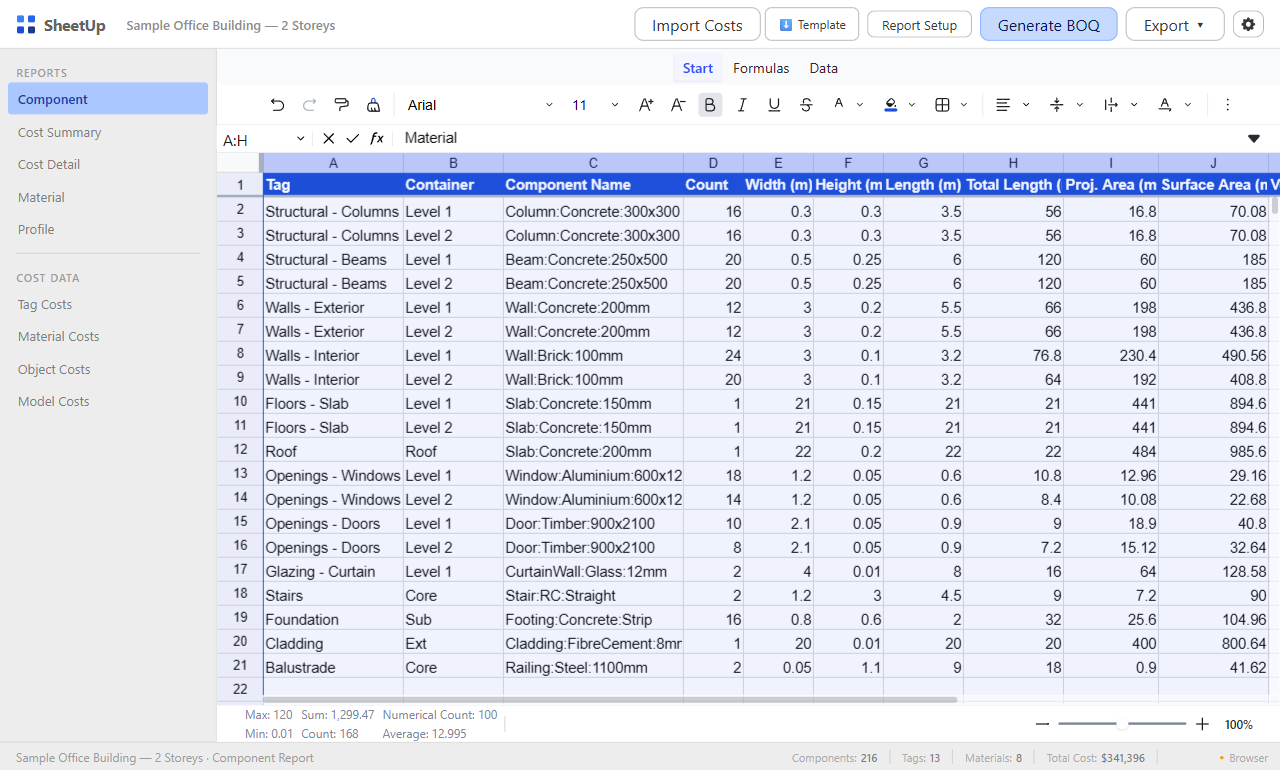
The Component Report after Generate BOQ, on the built-in sample model that opens at sheetup.3dshouse.com in a browser. It is sample data, not a real project.
Limits to know before you rely on a number
- Quantities are only as good as the model. SheetUp measures what is modelled. Unmodelled parts, wrong tags and non-manifold geometry are not corrected.
- Volume and weight are exact only for closed solids. For open or non-solid geometry the volume is the bounding-box volume, and the report shows a warning.
- Weight comes from a density table by material name. A material name is matched on whole words, the longest name first, so Reinforced Concrete uses 2,500 and Waterproof membrane does not match Water. A material with none of the names below has no weight, and a cost line on Weight then prices to zero. An item with several materials uses the one covering the largest area. The densities are generic values, not product data.
| Name in the material | Density (kg/m³) |
|---|---|
| Concrete | 2,400 |
| Reinforced | 2,500 |
| Brick | 1,800 |
| Masonry | 2,000 |
| Steel | 7,850 |
| Iron | 7,200 |
| Aluminium / Aluminum | 2,700 |
| Timber | 600 |
| Wood | 600 |
| Plywood | 550 |
| Glass | 2,500 |
| Plasterboard | 900 |
| Gypsum | 1,200 |
| Stone | 2,600 |
| Gravel | 1,800 |
| Topsoil | 1,600 |
| Water | 1,000 |
| Fibre Cement | 1,800 |
| Vinyl | 1,400 |
- Area is the bounding-box face (Height x Length). For curved or irregular parts use Surface Area, which sums the real faces.
- Same tag and same name means one row. If those instances differ in size, the dimensions shown are the first one’s and a warning says so. Give different sizes different names.
- No price data and no standard method of measurement. Every rate is yours, and SheetUp does not apply a measurement code such as SMM or CSI rules. Treat the result as an estimate to review, not as a priced tender.
- It needs an internet connection. The dialog loads from 3dshouse servers each time.
Free exports
Generating, viewing, editing and costing are not limited. One use is one report file actually saved (XLSX, CSV or HTML); cancelling the save dialog costs nothing, and the blank cost template does not count. You get 3 free uses per UTC day with a free 3dshouse account (sign-in is asked at the first export). The dialog shows how many are left today, for example 1 / 3 free exports today, and the count resets at midnight UTC.
Where SheetUp fits
SheetUp works from SketchUp geometry, tags, names and materials. If the project is documented in Revit, quantities and schedules come from the Revit model instead; SketchUp vs Revit vs Archicad, stage by stage shows which program owns which stage. For the number of full and cut tiles on a floor, TileUp has its own take-off.
Look at it in a browser first
The same page opens at sheetup.3dshouse.com with a static sample bill of quantities instead of a model, so you can look at the five views, the cost data and the settings before you install anything. No model is read there.
Install
- Download SheetUp .rbz.
- In SketchUp, open the Extension Manager, click Install Extension and choose the downloaded file.
- SheetUp appears in the Extensions menu and as a toolbar button. Restart SketchUp if it is not listed.
Requirements
- SketchUp 2022 or newer.
- An internet connection: the dialog loads from 3dshouse servers.
- A free 3dshouse account, asked at the first export. Generating and costing need none.
FAQ
What does SheetUp do?
It measures the groups and components of a SketchUp model, applies the cost lines you define by tag, material or component name, and shows a bill of quantities and cost estimate in five report views. The result exports to XLSX, CSV or HTML.
Which quantities does it report?
Count, Width, Height, Length, Total Length, projected area, surface area, volume and weight per tag and component name, plus faces and area per material. A Profile view lists slender members with weight per metre.
How is a cost calculated?
quantity = measure x factor; line cost = quantity x unit cost x (1 + waste/100); total = line cost x (1 + tax/100). The measure is one of Count, Length, Area, Surface Area, Volume or Weight. The same formula runs in every view.
Does it include a price database?
No. Every unit cost is entered in the dialog or imported from an Excel file by you. SheetUp does the measuring and the arithmetic; the rates and the choice of what to price are yours.
Why is a volume marked as an estimate?
Volume and weight are exact only for closed solids. For open or non-solid geometry the volume is the bounding-box volume and the report shows a warning. Fix the geometry in SketchUp (make it a closed solid) and generate again.
Why is the weight zero?
Weight is volume times a density looked up from the material name in a built-in table (listed in the limits above the FAQ). A material whose name contains none of its names gets no weight, so a cost line on Weight prices to zero. Use Count, Length, Area, Surface Area or Volume for those items.
Does the Excel file contain formulas?
No. Cells are written as numbers rounded to your decimals setting, not as live formulas. To change a price, edit the cost line in SheetUp and export again.
Can I use imperial units and my own currency?
Yes. Settings switch between metric and imperial display, offer 12 currencies (USD, EUR, GBP, CAD, AUD, NZD, CHF, SEK, NOK, DKK, JPY, SGD), 0 to 4 decimals and either 1,234.56 or 1.234,56. Unit costs are stored per metric unit and the cost dialog converts them for imperial display.
Is it free?
Generating, viewing, editing and costing are not limited. Saving a report file (XLSX, CSV or HTML) is one use, and you get 3 free uses per UTC day with a free 3dshouse account (sign-in is asked at the first export). The blank cost template does not count.
Which SketchUp versions are supported, and does it work offline?
SketchUp 2022 and newer. The dialog loads from 3dshouse servers each time, so it needs an internet connection.
Free: limited to 3 exports a day
Pro: unlimited, guaranteed to work, priority support