SketchUp
SketchUp Close Gaps Plugin: Edge Tools², S4U Find Gap, CloseOpens and Regionify
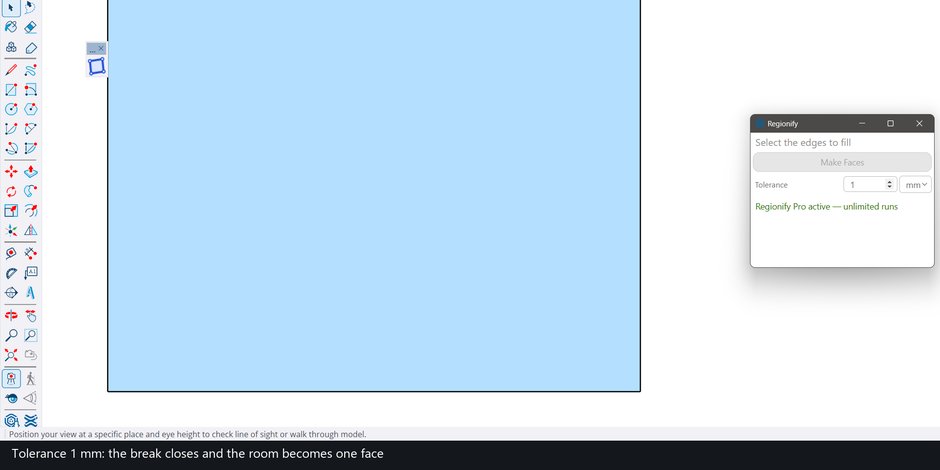
A gap of a fraction of a millimetre between two line endpoints is enough to stop SketchUp filling a loop, and on imported CAD it is the cause users name most often: “A common reason for missing faces with imported DWG files is gaps at endpoints” (DaveR, SketchUcation forum). You can deal with the breaks in two ways: find each one and close it (Edge Tools², S4U Find Gap, CloseOpens), or build the faces with a distance tolerance so that small breaks stop mattering (Regionify). This page compares both routes. Regionify is our own tool, so weigh its entries accordingly. It does not find or report gaps, and the limits section says where that hurts.
Why one small break blocks a face
SketchUp fills a loop only when its edges form a closed chain on one plane. A break between two endpoints leaves the chain open, so no face appears. Users describe the same symptom with other defects too. TIG: “Many CAD drawings are sloppily made and you might find small gaps in a loop of edges that mean no face can be made”, and “Sometimes the CAD-lines are not coplanar and can therefore never form a single face” (SketchUcation). DaveR on edge overruns: they “will cause problems with faces filling” (SketchUp forum). A 2022 reply in another thread says SketchUp is now less tolerant of small errors (SketchUp forum).
So a drawing that will not fill can have four different defects: a gap, an overrun, lines that overlap or cross with no shared vertex, or edges that are not flat. A gap tool only touches the first. The guide to imported DWG lines with no faces separates all four, and the page on overlapping lines covers the third.
How to find gaps in SketchUp lines
Forum users report using Edge Tools² to show the breaks (“Here I used Edge Tools 2 to show them”, SketchUp forum), and the extensions in the table below are built around the same job. By hand, on a loop that is already closed and flat, drawing an edge between two of its endpoints makes the face, and may leave redundant edges to clean up (SketchUp forum).
Gap tools compared
Everything in this table comes from the pages linked in it: vendor and listing pages, forum posts and, for ORAMBO, its public source code. We ran none of the paid tools. Where we could not open a current price or licence page, no price is printed.
| Tool | What its source says | Finds gaps | Closes gaps |
|---|---|---|---|
| Edge Tools² (ThomThom) | Free, requires TT_Lib² (Extension Warehouse listing), which comes first in search for this query; forum users use it to show gaps and to close open ends (forum thread) | Yes, per forum use | Yes, per forum use |
| S4U Find Gap (SUforYou) | “Find gaps. Find end point of edge and Auto Connect.” Version 2.1.1, listing updated 2024-10-02; listed as paid (SketchUcation listing) | Yes | Yes, Auto Connect |
| CloseOpens (Smustard, Todd Burch) | Described as “Close opens, intersect overlaps and extend close lines” (SketchUcation thread); one SketchUp forum regular (DaveR, 2019) says it was designed for poorly made CAD files (SketchUp forum) | Not stated | Yes (DaveR recommends it for gaps) |
| ORAMBO Face Tools | Make Faces with optional gap closing, end to end up to a tolerance (default 1 mm); Select Open Ends and Highlight Gaps diagnostics; interface text in Russian. Source read, not run (GitHub) | Yes | Yes, end to end |
| SketchUp by hand | On a loop that is already closed and flat, draw an edge between two of its endpoints; may leave redundant edges (forum) | By eye | Not covered by that source |
| Regionify (ours) | Builds faces from selected edges; points and line ends closer than its Tolerance count as one point | No | Yes, up to the Tolerance, while building faces |
The S4U tools are listed as paid on SketchUcation, without an amount on the pages we opened. Edge Tools² is free and requires TT_Lib² (Extension Warehouse listing). CloseOpens is described as not free by DaveR (SketchUp forum); we did not find an amount on a page we could open.
Where Regionify fits
Regionify is built to enterprise-grade standards. That is a commitment about how we build and support it, not a measurement; the checkable facts are the runs and the limits below. It is a SketchUp extension with one button, Make Faces, and one setting, Tolerance (default 0.1 mm, up to 25.4 mm, in mm or in). Select the edges and press the button: every closed loop that lies flat becomes a face, holes included.
- It closes small breaks as part of building faces. Points and line ends closer than the Tolerance are the same point, and an endpoint within the Tolerance of another edge joins that edge, so a T-shaped break closes as well. In SketchUp 2025 a room with a 0.5 mm break gave no face at the default 0.1 mm and one face after typing 1 mm; one undo returned it to none.
- It uses its own face building, not SketchUp’s default. Regionify works the loops out itself from the selected edges and hands SketchUp finished faces with their holes. The edges do not have to be intersected first: lines that cross, or a long edge lying over two shorter ones, are split where they meet. Four vertical and five horizontal lines with no shared vertex gave the 12 grid cells, and a long edge over two shorter collinear edges gave two faces.
- Your edges stay. No original edge was erased in any measured run; new faces take the tag that most of their boundary edges are on, and one undo removes everything built.
Measured in SketchUp 2025 on four public DXF drawings imported with SketchUp’s own importer, all edges selected, one press:
| Drawing | Edges | Faces made | Independent reference | Press, start to finish |
|---|---|---|---|---|
| Ground-floor plan | 3,987 | 62 | 62 | 1.9 s |
| Floor plan | 5,936 | 422 | 422 | 1.9 s |
| Site plan A | 8,882 | 349 | 349 | 2.6 s |
| Site plan B | 7,999 | 373 | 374 | 2.4 s |
The one-face difference on site plan B is an importer face that covers two cells; total area matched on all four. On the first three drawings the importer’s own faces were erased before the run; on site plan B the 49 faces the importer made were kept. These runs measure face building, not gap closing: the gap behaviour measured so far is the 0.5 mm room above.
Limits of Regionify
- It does not find, mark or report gaps and suggests no value. A break closes only if the Tolerance is larger than it (25.4 mm at most). A drawing with no closing chain gets no face.
- The Tolerance is an absolute distance and a large one costs faces. In test runs outside SketchUp on nine public drawings the default 0.1 mm lost nothing; 0.02 in and up lost faces on several, and one drawing lost a face that held 27% of its area.
- Flat faces only. A loop whose edges are not on one plane is skipped and reported (“No face made — 1 closed loop found, but its edges are not on one plane”).
- Requirements. SketchUp 2022 or newer and an internet connection (the dialog loads from 3dshouse.com; the geometry is computed locally in the dialog and nothing is uploaded). Run on Windows; Mac is untested. It is not on the Extension Warehouse yet and installs from its own page.
Which route for which drawing
- Many tiny breaks and you want faces: Regionify with a Tolerance just above the breaks.
- You need to see where the breaks are (to correct the drawing at source or send it back): a gap finder such as Edge Tools², S4U Find Gap or ORAMBO’s Highlight Gaps.
- Breaks bigger than the drawing’s smallest real detail: find and fix them. A tolerance that large would merge features that should stay apart.
- Overruns, overlaps or non-flat lines: a gap tool does not address them; start with the DWG diagnosis guide.
- Comparing face makers rather than gap tools: see the make-face plugin comparison.
Try any of them on your own file; every drawing breaks in its own way.
FAQ
Why is my shape not filling in SketchUp?
Usually the outline is not a closed chain of edges on one plane. The causes users report are a gap at an endpoint (SketchUcation), an edge that runs past its corner (SketchUp forum), lines that cross without a shared vertex, and edges that are not coplanar (SketchUcation). Close or find the break first; the table above lists the tools for that.
How to make a face from lines in SketchUp?
When the lines already form a closed, flat loop, SketchUp makes the face by itself. When a loop is already closed and flat but stays unfilled, a forum answer is that drawing an edge between two of its endpoints creates the face, though it may leave redundant edges to clean up (SketchUp forum). For many loops at once, a make-face extension saves the hand work; see the make-face plugin comparison.
Is there a Make faces plugin for SketchUp?
Yes, several: S4U Make Face (listed as paid), FaceUp, Eneroth Face Creator, ORAMBO Face Tools and Regionify, our own. The make-face plugin comparison covers them side by side on real CAD plans.
Free: limited to 3 runs a day
Pro: unlimited, guaranteed to work, priority support
- BevelUp — round or chamfer edges into real geometry, in one click
- Decimify — reduce the polygon count of a heavy model
- Tracepen — trace an image into SketchUp faces
- TileUp — turn a face into real 3D tiles, with a take-off
- Texturic — make seamless tile textures with PBR maps
- SheetUp — turn a SketchUp model into a bill of quantities and cost estimate
- PatchUp — turn selected edges into faces, flat or curved
- Regionify — turn selected edges into flat faces, holes included