

 Tiếng Việt
SketchUp
Restore Dynamic Component Attributes in SketchUp
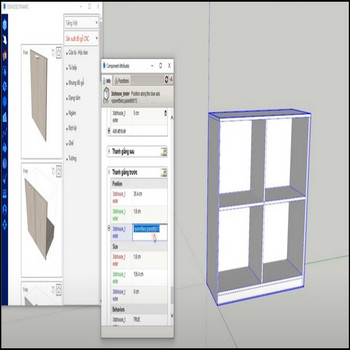
These dynamic component libraries ship with their authoring attributes personalized (renamed/obfuscated) for security, so the parametric behavior keeps working but the original editable labels no longer appear in the Component Attributes dialog. When you need to edit, study, or repurpose those parametric formulas, use the restore dynamic attributes tool to put the original attribute names back in the Component Attributes dialog.
Restoring labels only renames the existing dictionary keys back to their readable form — it does not re-run or rebuild the component, so your geometry, sizes, and current option values are left untouched. The component must already be a real dynamic component for this to do anything: the tool works on the SketchUp dynamic_attributes attribute dictionary, and if that dictionary was fully exploded or deleted (not just renamed) there is nothing left to relabel.
Restore Dynamic Component Attribute Labels in SketchUp — Tutorial Video
Steps by steps:
- Select the dynamic component, then click Restore attribute labels.
- The original dynamic properties are back — open Window > Component Attributes (or the Dynamic Components toolbar) to see the readable names and edit the formulas.

Tip: attribute names are stored per-definition, not per-instance, so restoring labels on one copy updates every instance of that component in the model at once. If you still see only the renamed labels after restoring, the component is most likely a separate definition (a “Make Unique” copy) — restore that copy directly. The Component Attributes dialog — and Dynamic Components generally — is a SketchUp Pro/Studio feature; SketchUp Go and the free web version do not support Dynamic Components at all, so there is nothing to place, configure, or restore there.
