

 Tiếng Việt
SketchUp
Copy Attributes Between Dynamic Components in SketchUp
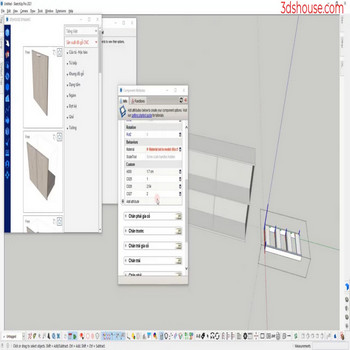
When you create a new dynamic component (dy_com) or this dy_com is similar to the old dy_com ,normally we will create a new dy_com, re-enter all the parameters, use the Copy Attribute tool in SketchUp to save more time.
Authoring dynamic components requires SketchUp Pro (a named-user subscription since the perpetual licence was retired in 2020), and as of SketchUp 2026 this is still true. SketchUp’s native Component Attributes dialog has no built-in “copy attributes between components” command — the copy tool shown here is a plugin workflow, because the core dynamic-component engine hasn’t been meaningfully updated in years and copying attribute sets by hand is otherwise the only path. A non-obvious gotcha when transferring attributes: any formula that references a sub-component or parent by name (for example parent!LenX or a named child) will silently break after the copy if the new component’s nesting or names differ — the formula text copies over, but the reference resolves to the wrong object, so always re-open and re-evaluate the pasted formulas rather than trusting the values.
How to Copy Attributes Between Dynamic Components in SketchUp (Video Tutorial)
Steps by steps:
- Click the dynamic component to copy properties – select properties to copy – click on new dy_com
- Attribute has been copied to the new dy_com.

Copy Attribute of dynamic

If you are starting a parametric component from scratch in 2026, weigh Live Components (Trimble Creator) as a parametric alternative instead: SketchUp 2026.0 shipped workflow improvements to them, and unlike dynamic components their configuration logic lives server-side, so they update parameters in real time but cannot be edited offline — a real trade-off the “copy attributes” approach for classic dynamic components avoids.
