

 Tiếng Việt
Jun
Tracepen is a free online image vectorizer that turns a raster image (PNG, JPG, WebP) into clean vectors in your browser – export SVG, PNG, PDF, or DXF (Lines, Hatch, Faces) for Figma, Cricut, Lightburn, CNC, AutoCAD, SketchUp, or Blender. A deterministic tracer (no AI). Free for 2-colour SVG / PNG; sign in with a 3dshouse account for every format at unlimited colours.
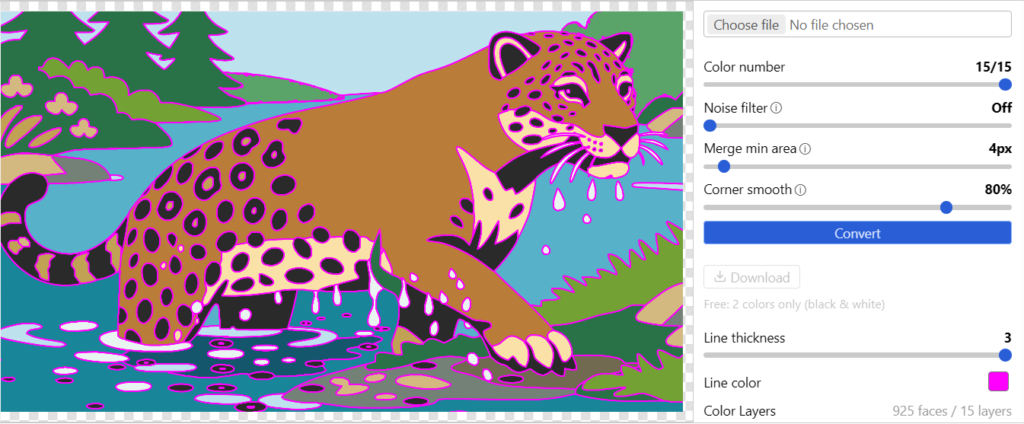
Tracepen Online Image Vectorizer — Video Demo
Free Online Vectorizer Features
- Many export formats – SVG (Figma, Illustrator, Inkscape), PNG, PDF, DXF Lines (Cricut, Lightburn cut, CNC), DXF Hatch (Lightburn fill), DXF Faces (SketchUp, Blender, Rhino).
- Auto photo / graphic detection – suggests a colour count; slide from 2 (black & white) up to the maximum.
- Per-layer editing – toggle visibility, change a layer’s hex, adjust stroke / noise filter / minimum region size.
- Deterministic – Wu colour quantization (OKLab) → Mumford-Shah merge → contour trace → Potrace Bezier fit. Same image in, same SVG out.
- Private free tier – 2-colour traces run entirely in your browser; sign in with a free 3dshouse account.
Install
Nothing to install – it runs in any modern browser. Sign in with your 3dshouse account to unlock Tracepen Online Pro (all formats, unlimited colours).
Requirements
- Any modern browser (Chrome, Edge, Firefox, Safari).
Export formats — which to use
| Format | Best for |
|---|---|
| SVG | Figma, Illustrator, Canva, CorelDRAW, Inkscape, Affinity Designer, web |
| PNG | Any tool without SVG support (Photoshop, PowerPoint, Keynote, Word) |
| Print layout, vector in slide decks | |
| DXF Lines (closed LWPOLYLINE) | Cricut, Silhouette, Lightburn (Cut), AutoCAD, Fusion 360, LibreCAD, CNC, vinyl cutting |
| DXF Hatch (solid HATCH) | Lightburn (Fill / Scan engrave), AutoCAD visual import |
| DXF Faces (3DFACE triangulated) | SketchUp, Blender, 3ds Max, Rhino, Cinema 4D — enable Merge Coplanar Faces on import |
Each region exports as a closed LWPOLYLINE, not a stack of line segments — so Lightburn and CorelDRAW treat it as fillable immediately, with no Edit → Close Path step to repair open contours (the failure most hand-traced or text-derived DXFs hit before they can be filled or offset).
How Tracepen compares
| Tool | Type | Pricing | Runs where | DXF for CNC / laser |
|---|---|---|---|---|
| Tracepen | Deterministic trace | Free · one-time Pro | Browser + SketchUp plugin | ✔ Lines + Hatch + Faces |
| Illustrator Image Trace | Deterministic trace | Subscription | Desktop | via export |
| CorelDRAW PowerTRACE | Deterministic trace | One-time | Desktop | via export |
| Inkscape Trace Bitmap | Potrace | Free | Desktop | via extension |
| Vector Magic | Deterministic trace | Subscription | Desktop + web | ✘ |
| Vectorizer.AI | AI | Subscription | Web | ✔ (outline only) |
Tracepen is the only free, browser-based, deterministic tracer that exports DXF Lines (for cutters) and DXF Faces (for 3D) out of the box — plus a native SketchUp plugin.
Import into your tool
- Figma / Illustrator / Canva / Inkscape / Affinity — drag-and-drop the SVG, or File → Open / Import. No conversion.
- Cricut Design Space / Silhouette Studio — upload the DXF Lines export; each colour becomes a separate cuttable layer. Use Lines, not Hatch — cutters follow outlines. Heads-up: Design Space accepts DXF only on desktop — the iOS and Android apps reject it, so upload from a computer (or fall back to SVG, which works everywhere).
- Lightburn — DXF Lines for cutting (outlines → Cut mode), DXF Hatch for engraving (filled regions → Fill / Scan).
- AutoCAD / Fusion 360 / LibreCAD — DXF Lines for outlines, DXF Hatch for filled regions; every colour becomes its own CAD layer.
- SketchUp / Blender / Rhino / 3ds Max — DXF Faces, then enable Merge Coplanar Faces on import. Without that option each colour region arrives as a raw triangle fan with every diagonal showing; the merge dissolves the shared edges back into one flat face per region — but only works because Tracepen keeps each region perfectly planar, so a single Push/Pull then extrudes the whole shape. Prefer native faces? Use the SketchUp plugin instead — no DXF round-trip.
FAQ
What does the free online vectorizer tier include?
2 colours (black & white), SVG and PNG export, unlimited traces – enough for most line-art, logo, silhouette, laser-cut, and Cricut work.
What does Pro unlock?
Unlimited colours and every format (SVG, PNG, PDF, DXF Lines / Hatch / Faces), plus the SketchUp plugin. One-time, via Tracepen Online Pro.
Does it use AI?
No – a deterministic tracer, reliable for production (laser cutting, CNC, print). Because the pipeline is fixed, re-tracing the same file after a tool update gives a byte-identical result — handy when a cut file has to match an earlier production run exactly.
Is my image uploaded?
Free 2-colour tracing runs entirely in your browser — nothing leaves your machine. Premium multi-colour traces are sent to an API endpoint, processed, and discarded after the response — never stored.
What image format should I upload?
PNG is best for flat artwork, logos, screenshots and icons. JPG works for photos — raise the Noise filter to 3–6 to clean JPEG artefacts before tracing. One thing JPG cannot carry is transparency: flatten or matte your subject onto a solid colour first, since a traced JPG always fills the whole frame whereas a PNG with an alpha channel keeps the background empty.
How does Tracepen compare to Vector Magic, Vectorizer.AI or Adobe Image Trace for DXF and CNC use?
Tracepen is the only free, browser-based, deterministic tracer that exports DXF Lines and DXF Faces for CNC, laser and 3D out of the box — see the comparison table above.
