

 Tiếng Việt
SketchUp
Delete Hidden Objects in SketchUp — Batch Cleanup Tool
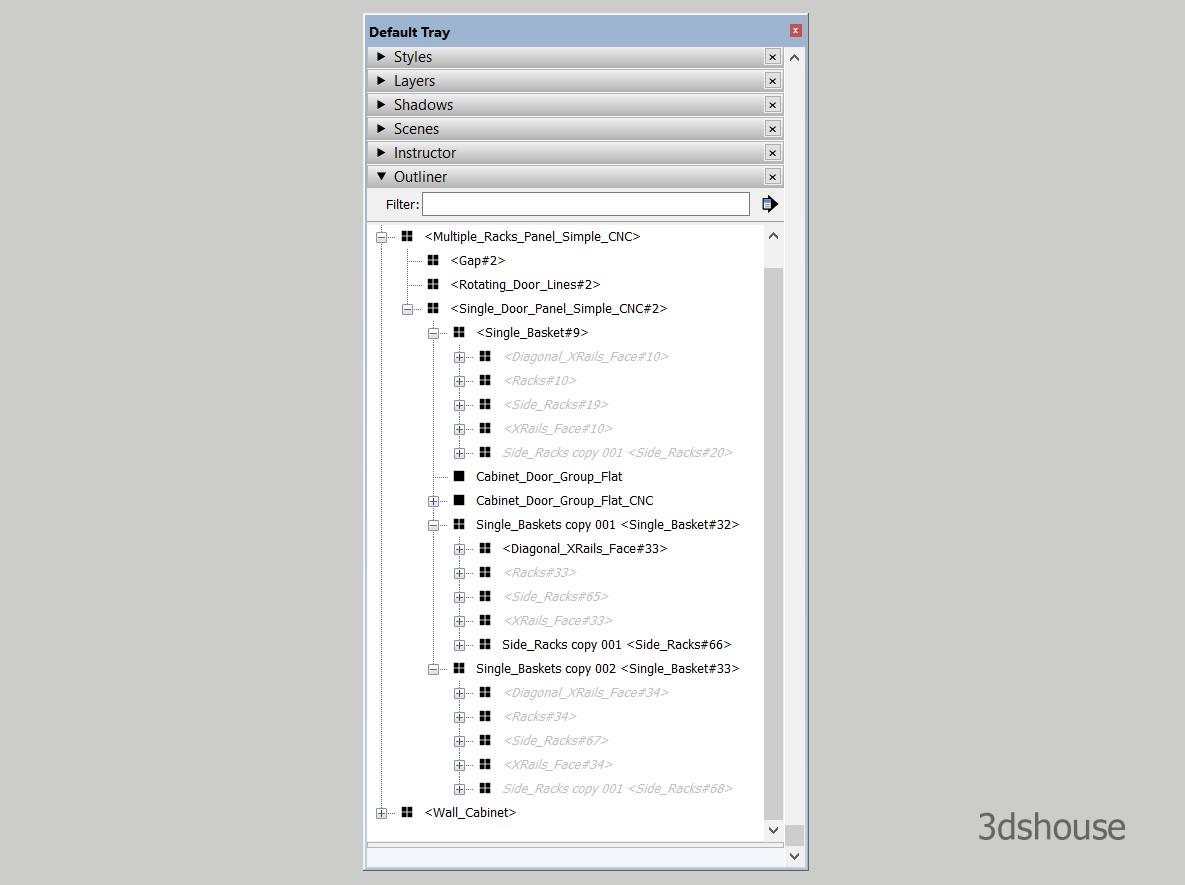
Objects hidden with SketchUp’s Hide command can be batch deleted quickly — the Delete Hidden tool removes all hidden geometry at once instead of having to search and delete each object manually.
Hidden objects vs hidden by tag in SketchUp — know the difference first
There are two completely different kinds of “invisible” in SketchUp, and only one of them is what this tool targets. The Delete Hidden tool removes geometry hidden with the Hide command (right-click > Hide, or the entity flagged hidden in Entity Info) – it does NOT touch objects that are simply on a turned-off Tag/Layer. A group on an invisible tag is still “visible” as far as its own hidden flag is concerned, so it survives the cleanup. If something refuses to delete, check whether it is hidden or just tagged off.
To find and delete hidden objects manually:
- Option 1: Go to Menu View -> Hidden Geometry (and, in SketchUp 2024 and later, the separate View -> Hidden Objects toggle). SketchUp 2024 split the old single “Hidden Geometry” switch into two: Hidden Geometry shows softened/hidden edges and faces, while Hidden Objects shows hidden groups and components – if you only toggle one, the other type stays invisible and you will think nothing is hidden.
- Option 2: Check in the Outliner panel (Menu Window -> Default Trays -> Outliner). Hidden groups and components appear with a greyed-out (italic) name in the Outliner even when Hidden Objects display is off, so the Outliner is the only reliable way to confirm a model truly contains no leftover hidden entities.
Automatically find and batch delete all hidden objects in SketchUp:
- The 3dshouse Dynamic plugin has a built-in tool to mass delete hidden objects.
- Click icons
 to automatic delete all hidden Objects
 to automatic delete all hidden Objects
Why cleaning hidden geometry matters before CNC export and before Purge
Leftover hidden objects are a common source of bad nesting and silent file bloat. Deleting a hidden component instance does not remove its definition from the model – the definition keeps sitting in the In Model library and stays in the file size, so run Purge Unused right after Delete Hidden to actually reclaim the space. For Abf/CNC work this also stops invisible faces from being picked up during nesting, which otherwise produces stray parts in the DXF.
