

 Tiếng Việt
SketchUp
How to Copy Array in SketchUp — Linear Array Tutorial
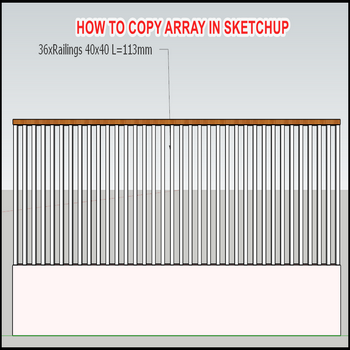
There are 2 ways to copy a linear array in SketchUp. Both use the Move tool in copy mode (press M, then tap Ctrl on Windows / Option on Mac before you drag) — SketchUp has never shipped a dedicated array command, so these Measurements-box tricks are the built-in way.
Copy Array in SketchUp — Linear Array Tutorial Video
Steps by steps:
- The first way, copy the model to an end point, then input “/number” — for example “/35”. This is the internal (divide) array: it drops 34 evenly spaced copies between the original and the copy you just placed, so you set the two endpoints and let SketchUp work out the spacing.
- The second way, copy the model by the dimension between 2 models — for example 113mm — then input “35x”, where “x” is the X key on the keyboard. This is the external (multiply) array: it repeats that exact gap 35 times outward, so use it when you know the spacing (every 600mm, every 24″) rather than the endpoints.
The order matters when copying arrays in SketchUp: “/” divides the span up to the copy you placed, while “x” multiplies the gap beyond it. A frequent mistake is reaching for “/” when you actually wanted repeating spacing.
The array stays editable as long as the Move tool is still active and you haven’t started another action — just retype a different value (e.g. “20x” then “30x”) and press Enter again to recount the whole row live. Click elsewhere, pick another tool, or type anything non-numeric and the count locks in; after that you’d have to undo and redo the move.
Two more things worth knowing for clean SketchUp arrays: the object you are arraying should be a group or component first — arraying loose, ungrouped geometry sticks every copy to the next and “glues” them into one tangled mesh. And if you make components (not groups), every copy in the array is a live instance, so editing one updates the entire array at once — ideal for fence posts, stair treads, or louvers you may want to tweak later.

Copy array in Sketchup

