

 Tiếng Việt
SketchUp
Remove Object Material in SketchUp — One-Click Tool
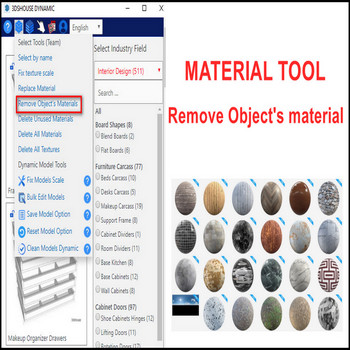
Removing an object’s material in SketchUp is awkward by default — no built-in remove material button exists — there is no single “remove” button, so you normally have to repaint the geometry with the Default material by hand. The Remove object’s material tool from 3dshouse.com solves this in one click, working on faces, groups, and components alike (tested through SketchUp 2026, which is subscription / named-user only — there has been no perpetual license since 2020).
How to Remove Material from Object in SketchUp — Tutorial Video
Steps by steps:
- Select object’s material – remove object’s material tool click.
- Object’s material has been removed.
- Repeat for other object’s material, this tool available for component or group.
Why this matters (the Default-material trick):
In SketchUp a group or component can carry a material at the object level, completely separate from the materials painted on the individual faces inside it. A painted parent only “trickles down” to faces that are still set to the Default material — any face already given its own material is locked and ignores the parent. So once a group has been painted, you cannot recolor it from the outside anymore; this tool strips the object-level material and resets faces to Default, which is exactly what lets the parent override start working again — the fastest way to clear painted groups or components.
The Paint Bucket can never remove a material — sampling the Default swatch only paints a “no material” state onto whatever you click, and it stops at the first painted face it hits instead of reaching nested geometry. The matching native workaround is opening Entity Info and clicking the material thumbnail to revert a single selection to Default, but that is one entity at a time. Deleting a material from the Materials panel (“Delete” / “Delete all”) does not just unpaint it — it reassigns every face that used it back to Default model-wide, which can wipe positioning and orientation you didn’t mean to touch. This tool keeps the scope to exactly what you select.

