

 Tiếng Việt
SketchUp
SketchUp MDF Glass Cabinet Door CNC — 2-Panel Method
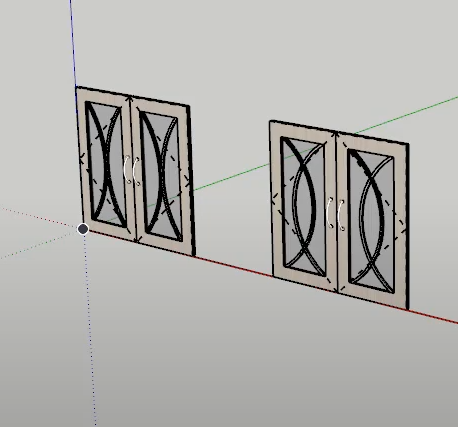
A glass-frame MDF cabinet door is hard to design and hard to manufacture in SketchUp: a single 17mm sheet routed on the CNC leaves a thin, wide frame that warps and is awkward to machine in one pass. Instead, the 3dshouse plugin splits the door into 2 panels of 9mm each that are CNC cut separately and then glued back into one. Two 9mm faces glued back-to-back form a balanced panel: each layer pulls against the other, so internal stress cancels out and the door stays flat far better than a solid 17mm board, which tends to cup toward whichever face the router removed more material from. It also lets you nest the thin parts more efficiently and machine each side with a smaller bit.
CNC MDF Glass Cabinet Door in SketchUp: Video Tutorial
Step 1: Set model parameters
Use the 3dshouse SketchUp plugin to load the MDF glass door model, then adjust the parameters to suit your CNC needs. The plugin runs inside SketchUp 2026, which is now a named-user subscription (no perpetual license since 2020) — the door generator works the same across recent SketchUp 2026 releases.
- Select the door in the plugin
- Adjust door size to suit actual needs
- Choose interactive dynamic components to drive the open/close motion of the door
- Clean Dynamic button: select the 3dshouse plugin’s Clean Dynamic tool and click the model to strip the dynamic attributes and weld the panels together. Run Clean Dynamic before any manual edit — while the dynamic component is still “live”, SketchUp re-evaluates its formulas every time it redraws, so any vertex you move by hand is snapped back to the parametric size on the next redraw. Welding also fuses coplanar faces so the two 9mm halves export as clean single outlines instead of a stack of duplicate edges that the CNC reads as overlapping toolpaths.

Step 2: Nesting with the ABF plugin
Select all parts and use the free ABF nesting plugin to output the SketchUp CNC drawings. Note that the two 9mm sheets are nested and cut as separate parts, then glued together to rebuild the original 17mm door profile. ABF doesn’t send G-code directly — it exports a layered DXF (cut, drill, pocket, edge-banding each on its own layer), which you then import into your CAM/nesting software. So make sure both 9mm halves carry the same grain direction in the layout: glue two panels with crossed grain and the balancing effect that keeps the door flat is lost.
