

 Tiếng Việt
Jun
Polygon reduction is the problem 3D workflows hit every day — online mesh simplifiers fill this gap without requiring any install – game engines need a triangle budget, web 3D and AR load faster with fewer polygons, and slicers choke on dense scans. Decimify reduces polygon count in your browser — a free online 3D mesh simplifier — while keeping UV seams and material boundaries clean. Free for basic use; sign in with a 3dshouse account for Pro.
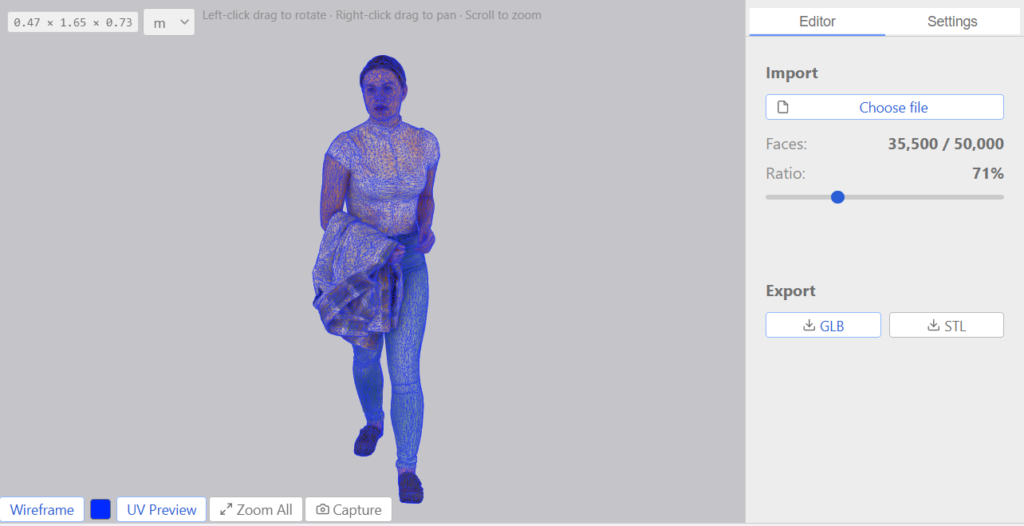
Decimify Online Mesh Simplifier Features
- Real-time slider – the whole LOD pyramid is computed once, then scrubbed instantly with no rebuild.
- Attributes stay intact – UV seams, normals, and material boundaries survive every reduction level. This works because the collapse cost is a quadric extended past XYZ into the UV channel, so a seam vertex carries a far higher merge penalty and is the last thing to go – that is why textures don’t tear at aggressive reduction the way they do in geometry-only decimators.
- GLB / STL / USDZ – GLB keeps materials and textures; STL for 3D printing; USDZ export for AR Quick Look.
- Off the main thread – WebAssembly + a background worker keep the UI responsive on million-triangle models.
- Private by design – files are parsed in-browser; no upload; the free tier just needs a free 3dshouse account.
Install
Nothing to install – it runs in any modern browser. Sign in with your 3dshouse account to unlock Decimify Pro. One purchase covers both surfaces — the SketchUp plugin and the web app.
Requirements
- Any modern browser (Chrome, Edge, Firefox, Safari).
- WebAssembly support (standard on current browsers).
Supported formats
| Format | Materials | UVs | Notes |
|---|---|---|---|
| GLB (glTF) | Preserved | Preserved | Recommended. Single file with geometry, materials and textures. |
| STL | — | — | Geometry only – no UVs, no normals, no shared vertices. Best for 3D printing. |
| USDZ | Preserved | Preserved | Export only. Apple AR Quick Look compatible. |
For any other format, convert to GLB first using Blender (File → Export → glTF Binary).
Two real gotchas on the format edges: STL has no vertex sharing – every triangle stores its three corners independently – so a clean reduction often shrinks the file far more than the triangle count alone suggests, and re-welding on import is what lets the decimator actually collapse anything. And if a GLB won’t load, check whether it was exported with Draco mesh compression; the buffers have to be decoded before any reduction can run, and not every exporter writes a decodable Draco stream.
Typical uses
- Reducing a photogrammetry scan before 3D printing.
- Generating LODs for a Three.js or Babylon.js scene.
- Baking a USDZ for AR Quick Look.
- Shaving file size off a glTF before uploading to Sketchfab or a model viewer.
- Hitting a polycount budget for a game asset without reopening Blender.
If you’re targeting AR Quick Look, decimate with the device in mind: Apple’s guidance is to keep a single object well under ~100k triangles and a whole scene under roughly 500k, because RealityKit loads the entire USDZ before it shows anything – so a too-dense model stalls on the first tap rather than degrading gracefully. Pulling the count down with Decimify before export is usually the difference between a snappy “View in AR” and a model that never appears.
FAQ
What formats can I use?
Import GLB or STL; export GLB (with textures), STL, or USDZ. Convert other formats to GLB in Blender first.
Is my model uploaded?
No – everything runs in your browser. No upload; the free tier just needs a free 3dshouse account.
Is there a SketchUp polygon reducer version?
Yes – the Decimify SketchUp plugin simplifies geometry in place while keeping groups, components, and soft edges.
Is my model uploaded to a server?
No. Files are parsed in your browser — no upload; a free 3dshouse account is required. The reduction runs on WebAssembly off the main thread, so the UI stays responsive even on million-triangle models.
