

 Tiếng Việt
SketchUp
Bed Frame with Drawers — SketchUp Dynamic Component
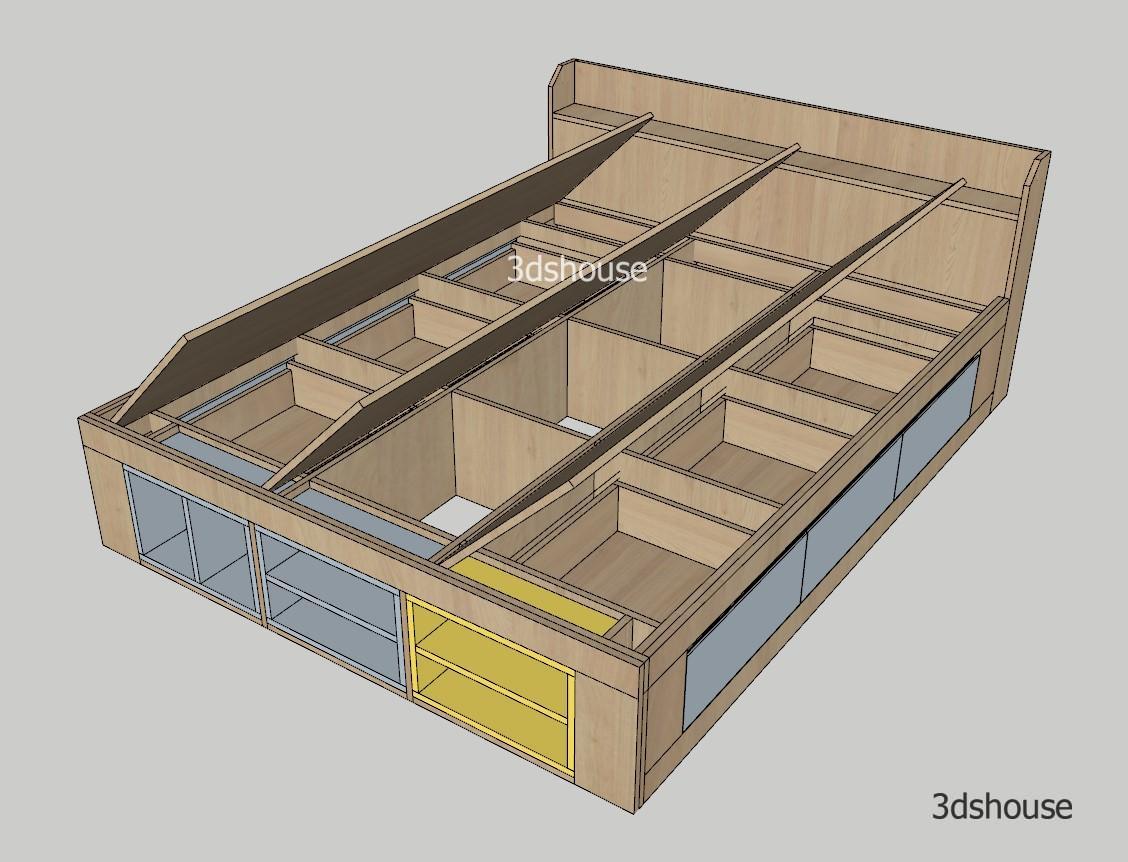
Highly customizable SketchUp dynamic component bed frame with drawer model following real furniture construction specs. Just drag the parameters in Component Options to quickly complete the parametric production design of a drawer bed. Works effectively with the ABF plugin.
https://www.youtube.com/watch?v=oFD4mftu0oI
Bed Frame SketchUp Dynamic Component – Parametric Component Options
- Thickness
- Mattress Length
- Mattress Width
- Hide Mattress Base
- Lower Mattress
- Number of Mattress Base Panels
- Mattress Base Panel Thickness
- Headboard Setup
- Headboard Rail Height
- Side Drawer Setup
- Number of Drawers
- Drawer Rear Offset
- Drawer Bottom Offset
- Drawer Front Offset
- Drawer Top Offset
- Front Shelf Setup
- Number of Shelves
- Shelf Bottom Offset
- Shelf Side Offset
- Shelf Top Offset
- Height
Usage notes:
- To adjust parameters, open Window > Component Options and type values directly — NEVER use the Scale tool to resize the bed. Scaling treats the whole thing as a regular component: it stretches all geometry instead of regenerating the correct number of drawers/shelves, distorting the structure. Drawer and shelf counts only increase correctly when you type into the “Number of Drawers” / “Number of Shelves” fields.
- Dynamic Components only run in SketchUp Desktop — SketchUp for Web does NOT support dynamic components. Free SketchUp users (SketchUp for Web) cannot open or interact with the drawer count or mattress settings at all: Dynamic Components require an extension, and SketchUp for Web does not support extensions. Only the paid desktop editions (SketchUp Pro or Studio) can open Component Options to resize this bed frame, and editing the formulas/attributes still requires a Pro subscription.
- The drawer and shelf repeat mechanism uses SketchUp’s Copy count attribute: the original is Copy = 0, each copy adds 1. This way each drawer repositions itself via formula without manual copying — change one number and the whole row spaces evenly.
- For ABF to export a cutlist with the correct count and name for each panel, child components must have clear names; if drawer copies end up with duplicate definitions, ABF may combine panel counts incorrectly. Always verify panel counts in the ABF sheet after changing drawer numbers before quoting production.
- Internal Dynamic Component units are always in inches even if the model is set to mm; if a dimension jumps unexpectedly after typing a value, check the model units (Window > Model Info > Units) before suspecting the component.
Other bed models:
More SketchUp tools by 3dshouse
