Tiếng Việt
Open Decimify Online (free, no install) →
Decimify is an online mesh simplifier: it reduces the triangle count of a GLB or STL model inside your browser tab, with a slider you drag while watching the result. Nothing is uploaded — the file is parsed locally, and the simplification engine is a Rust crate compiled to WebAssembly running in your own browser’s worker threads. A free 3dshouse account is required to open the tool, and it covers every feature at every reduction level, with 3 exports per UTC day. Decimify Pro removes the daily limit for $40 once, and that single purchase covers both the browser app and the SketchUp plugin.
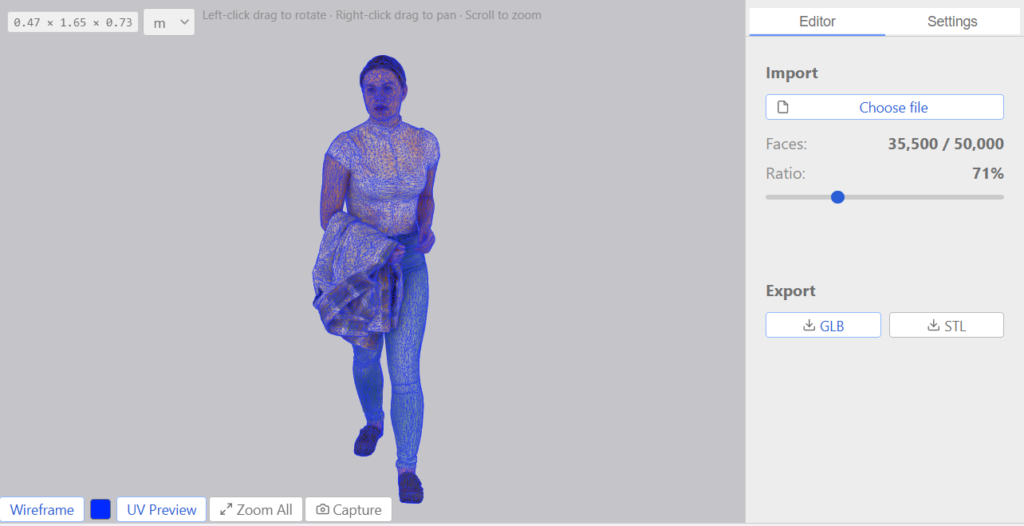
Why the slider is instant: it is not re-simplifying
Most polygon reducers recompute the mesh every time you change the target, so comparing 40% against 60% means waiting twice. Decimify builds once, at load, and it builds all the way down: the app passes no target face count, so the encoder’s default of 4 applies and the builder keeps collapsing until roughly 4 faces remain, recording every collapse as a reversible vertex-split record.
The result is a base mesh plus a stream of undo records — not a pyramid of baked LOD copies. Dragging the slider walks that stream forward or backward in place, which is why every level between the original and the floor is already available the moment the build finishes, and why it is monotonic in both directions. Level 0 is special-cased: instead of rewinding the stream, the viewer swaps each sub-mesh back to an untouched clone of the original geometry, so “back to the original” is exact rather than reconstructed.
The reduction itself is iterative edge collapse ranked by Quadric Error Metrics (Garland & Heckbert, SIGGRAPH 1997), in the progressive-mesh representation from Hoppe (SIGGRAPH 1996), with Hoppe’s 1999 appearance-attribute quadric for UV. The core is a port of the simplifier structure in meshoptimizer. Each pass ranks every collapsible edge by directed quadric error and applies the cheapest non-conflicting subset, then refreshes the quadrics — and an adaptive break ends a pass when only expensive collapses are left, rather than dipping into bad ones to hit a number. The build is spread across a pool of max(1, hardwareConcurrency - 1) workers, one resident simplifier per sub-mesh, and every typed array crosses back to the page as a transferable (zero-copy) buffer.
What the reduction percentage actually means
The slider runs 0–100 and maps to keepRatio = 1 - level/100. Per sub-mesh, targetFaces = max(4, round(originalFaces × keepRatio)).
- It is a target triangle-count ratio, applied per sub-mesh — not a vertex count, and not a whole-scene budget. A scene of ten objects at 50% gives each object 50%, not a shared 50% pot.
- Sub-meshes with fewer than 4 faces are skipped and never enter the simplifier at all.
- The panel shows the achieved result separately: Faces: current / original and Ratio: n%. Read the Ratio, not the slider — the two can diverge, and when they do the next section is almost always the reason.
Maintain UV: the setting that decides whether the slider moves at all
If you drag to 70% and the Ratio readout barely budges, this is the cause in nearly every case. A textured model whose UV is pinned per face — heavy upholstery exported out of SketchUp, plenty of 3D Warehouse furniture — carries an independent UV slot for every triangle at every shared vertex. With Maintain UV on, each of those vertices is a UV discontinuity, and the simplifier refuses to collapse it. The app will say so: when slider reduction exceeds achieved reduction by more than 20 points it shows “Maintain UV is limiting reduction — try disabling it in Settings.”
The trade-off is a contract, not a preference:
- Maintain UV on — seamless. The output is texture-identical to the source, because UV is carried through the simplifier as a real per-vertex attribute. The price is that the slider can lock.
- Maintain UV off — best effort. The mesh reduces freely and UV is reconstructed at render time. Before positions are deduped, each sub-mesh snapshots its per-face corner UVs and original corner positions; every render tick the worker solves the barycentric coordinates of each surviving corner’s current position inside its original triangle and emits
UV = γ·U0 + α·U1 + β·U2. The anchor is fixed at load, so the mapping does not drift across chained collapses.
Because adjacent faces are solved independently with no shared anchor (matching SketchUp’s own per-face projection semantics), the visible cost of turning it off is small seams between faces whose corners have drifted apart — the per-face pattern itself is preserved. In the browser app, toggling it rebuilds the session by itself; there is no need to pick the file again. And if a mesh genuinely needs both deep reduction and intact textures, the honest answer is that no decimator can give you that: the model has to be re-UV’d (Blender, Maya, RizomUV) so adjacent faces share UV slots, then re-imported.
The three settings, and when to touch each one
- Lock boundaries (on by default) — “Keep boundary vertices fixed during simplification”. Every vertex on an open edge is force-promoted to locked after classification, and the lock propagates around the wedge cycle so multi-wedge boundary corners stay rigid. Leave it on for anything with an open border: a scanned surface, a cut-away, a single-sided panel. Turn it off only when you accept the silhouette pulling in.
- Preserve creases (on by default) — “Protect sharp edges (≥ 90° angle) from being smoothed”. Sharp edges get an extra perpendicular plane quadric, and any collapse that would produce a post-collapse fold at least as sharp is rejected outright. Keep it on for hard-surface work (machined parts, furniture, architecture). Turning it off buys extra reduction on organic scans, where there is no real crease to protect.
- Maintain UV (on by default) — see above. This is the one knob that changes what is even possible.
All three persist in localStorage, so they survive a reload. The Smooth angle option you may read about elsewhere is SketchUp-only: it governs which edges get softened on the way back into a SketchUp model, so it does not appear in the browser app.
Simplify a mesh online in four steps
- Open the app and sign in with your free 3dshouse account.
- Click Choose file and pick a
.glbor.stl— the picker accepts only those two extensions. The progress bar runs to 100% as the build slots finish; the slider is disabled until then, showing “Preparing simplification…”. - Drag the reduction slider and watch Faces and Ratio. Camera controls are printed over the viewer: left-click drag to rotate, right-click drag to pan, scroll to zoom.
- Under Export, click GLB or STL. What gets written is the current slider state. Each export spends one of the day’s three free take-outs.
One overlay worth understanding before you trust the numbers: the chip at the corner of the viewer prints the bounding box as W × D × H with no unit suffix, and the dropdown beside it is the unit. GLB and STL carry no length metadata, so loading a file resets that dropdown to metres — if the dimensions look off by a factor of a thousand, that dropdown is the fix, not the file.
Formats: what goes in, what comes out
| Format | Materials | UVs | Notes |
|---|---|---|---|
| GLB (glTF) | Preserved | Preserved | Recommended. One file carrying geometry, materials and textures. Import and export (binary glTF). |
| STL | — | — | Geometry only — no UVs, no materials, no shared vertices. Import and export (binary STL). Best for 3D printing. |
Those two are the whole list: the file picker accepts .glb and .stl, and the exporters write binary glTF and binary STL. There is no USDZ export — it was removed from the codebase in April 2026, so any page still claiming it is out of date. For any other source format, convert to GLB first in Blender (File → Export → glTF Binary).
Compressed GLB files open, but the export is uncompressed. Files using Draco mesh compression, EXT_meshopt_compression or KTX2 textures are decoded in your browser on load (since September 2026). What comes out is a plain GLB: no compression extension, KTX2 textures written back as PNG. So the exported file can be larger on disk than the compressed original even with far fewer triangles — a 325 KB meshopt + KTX2 test file came out at about 2 MB. If download size matters, re-compress the result afterwards (for example with gltf-transform or Blender’s glTF exporter).
And the STL detail that explains wildly different results between two files that look the same: STL stores every triangle’s three corners independently, with no vertex sharing, so the mesh has to be welded before anything can collapse. Decimify does that in the Rust builder, and the dedup is bit-exact on the raw 32-bit float bits of (x, y, z) — there is no tolerance-based welding anywhere in the pipeline. Corners that agree to the last bit become one vertex; corners that differ in the last bit stay two, get classified as border or complex topology, and reduce far less. A clean STL out of the same exporter welds perfectly; an STL that has been through a lossy round trip may not.
What survives a reduction: multiple meshes, nodes and hierarchy; materials, including multi-material meshes (per-face material slots are rebuilt on every scrub tick); UVs, when Maintain UV is on; normals, which are re-baked per tick in the worker. Vertex colours are not carried — the only attribute handed to the simplifier is UV. The app raises what it had to skip rather than hiding it: “N texture(s) missing” and “Skipped N submesh(es) with non-finite coordinates”.
Browser app or SketchUp plugin?
Both surfaces render the same interface, from the same code, with only a handful of deliberate differences — so this is a question about where your model lives, not about features.
- Browser — a current browser with WebGL and WebAssembly, nothing to install, and the model comes off your disk as a GLB or STL. Best when the file is already an exported asset: a scan, a downloaded model, a game asset, something headed for a web viewer or a slicer.
- SketchUp — SketchUp 2022 or newer, installed as an
.rbzthrough Extension Manager. It reduces a group or component that is already in your model and commits the result back in place, so every instance of that component updates at once and the whole write is a singleEdit > Undo. That is the one thing the browser app cannot do: see the Decimify SketchUp polygon reducer for the extension side.
One Decimify Pro purchase covers both, because Pro is an entitlement on your 3dshouse account rather than a per-surface licence.
Which tool fixes which cause of a heavy model
“My model is heavy” has three different causes and they need three different tools. Reaching for the wrong one is the most common waste of an afternoon.
- Too many triangles — a photogrammetry scan, CAD tessellation, subdivided organics, 3D Warehouse furniture built at furniture-catalogue density. This is the only cause a decimator fixes, and it is what Decimify does: here in the browser for exported files, or inside SketchUp for geometry already in the model.
- Unused components, materials, styles and layers still stored in the file — that is file weight, not triangle count. Decimify does nothing for it; SketchUp’s own purge does. See how to purge unused SketchUp content.
- Stray edges, coplanar face litter, duplicate or reversed faces — a topology problem, not a density problem. That is a cleaner’s job: CleanUp³ for SketchUp.
Reducing triangles will not purge anything, and purging will not remove a single triangle. Check which one you actually have before you pick a tool.
Free and Pro, exactly
- Sign in with a free 3dshouse account when the tool opens. Whether the gate is on is a server switch the app asks for at startup, and an unreachable server keeps it on.
- Free is every feature at every reduction level. No watermark, no locked options, no reduction ceiling. The old 30% free cap is gone — it was replaced by a daily meter in September 2026, so treat any page still quoting it as stale.
- The meter counts take-outs: one export — or, in SketchUp, one commit — is one use. Three per UTC day, per account, resetting at the next UTC midnight. The server is the only counter, so the number is the same across every browser and machine you sign in on.
- From the first export the bottom bar shows “n / 3 free exports today · Get Decimify Pro — $40”. Spend them all and the next export is refused with “Free limit reached: 3 / 3 exports used today. Nothing was exported” plus the hours until they return. Buy Pro from there and the export that was refused runs by itself as soon as the payment goes through.
- Pro = unlimited take-outs, $40 one time, one product for the browser app and the SketchUp plugin. No subscription, no team tier, no seat limit, and no licence key to paste: Pro is an entitlement on your account, so the app picks it up without a restart.
- If 3dshouse is unreachable the metering fails open on purpose. An outage must not brick the tool.
Real limits worth knowing before you start
- No file-size limit and no triangle limit exist in the code — the ceiling is the memory of the browser tab, which is also why there is no honest number to quote here. For scale, the sample models shipped with the app run from 3.3 MB to 16.7 MB.
- It is not offline. The engine runs locally and your geometry never leaves the machine, but the page itself and the sign-in check come from the network.
- Non-manifold topology is classified, not repaired. Locked vertices never collapse; border vertices only into border or locked; seam only into seam or locked. Decimify reduces a mesh, it does not heal one — run a repair pass first if the mesh is broken.
- Some heavily per-face-pinned meshes can still refuse to reduce even with Maintain UV off, because canonical vertices carrying three or more attribute wedges classify as locked. The permissive option that would let them through is off, matching upstream meshoptimizer behaviour, and the code names it as an outstanding defect rather than pretending otherwise.
Typical uses
- Reducing a photogrammetry scan before 3D printing.
- Generating LODs for a Three.js or Babylon.js scene.
- Shaving file size off a glTF before uploading to Sketchfab or a model viewer.
- Hitting a polycount budget for a game asset without reopening Blender.
FAQ
Is there a free online STL simplifier?
Yes. Decimify Online reduces STL and GLB meshes with every feature and every reduction level available for free; a free 3dshouse account is required, and it allows 3 exports per UTC day. Unlimited exports are $40 once.
How do I reduce the triangle count of an STL file?
Open the app, click Choose file and pick the STL, drag the reduction slider until the Ratio readout shows the triangle count you want, then export as STL. The slider is a target triangle ratio applied per sub-mesh, and the Faces readout shows current versus original.
Is there an online version, or do I have to install a plugin?
The browser app needs nothing installed — the engine is WebAssembly running in the page. The separate SketchUp plugin exists only because it can reduce geometry already inside a SketchUp model and commit it back in place; one Pro purchase covers both.
Does it work on a Chromebook?
Yes. The only requirements are a current browser with WebAssembly and WebGL, so ChromeOS and Linux behave exactly like Windows and macOS. The SketchUp plugin, being a SketchUp extension, does not.