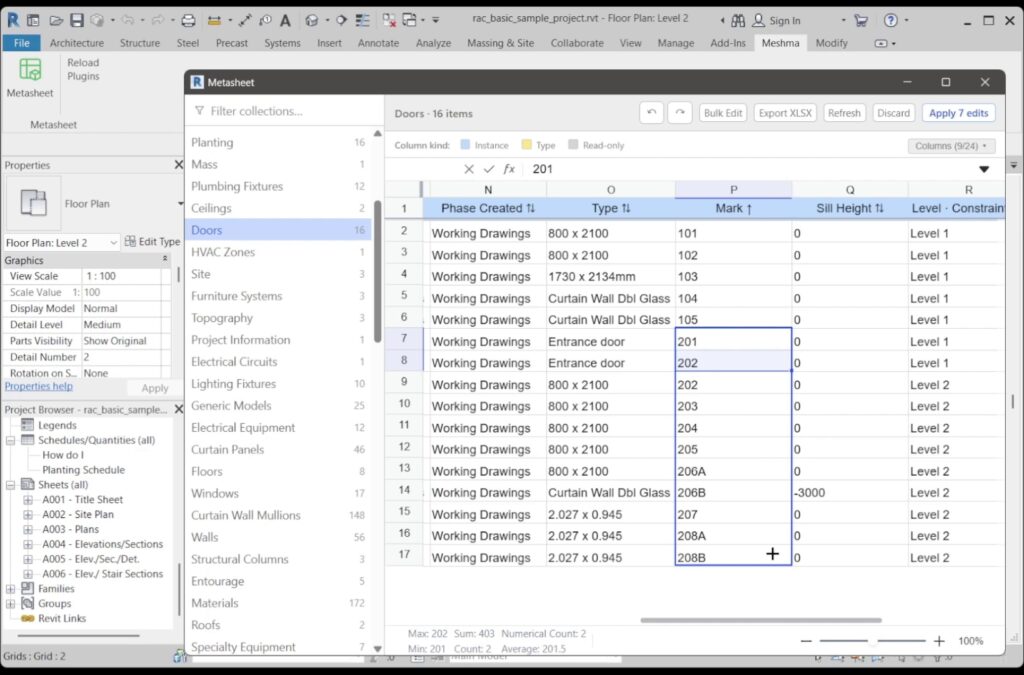


Metasheet is a Revit add-in (Revit 2022 to 2027, Windows 10 or 11, 64-bit) that edits Revit parameters in a spreadsheet grid. It covers elements, family types, sheets, views, rooms, levels, grids, revisions, materials, project information and schedules, with Bulk Find & Replace, Prefix/Suffix, export to Excel and import back (rows are matched by Element ID and your edits wait until you Apply).
Why Metasheet
- Type Name and Family Name are editable. In the Revit API these are not Parameters at all — they are the element’s Name property, which is why most add-ins list them as read-only.
- Swapping two names in one apply works. Renaming A-101 ↔ A-102, or shifting a whole Sheet Number range up by one, normally fails: Revit rejects the duplicate that exists halfway through the batch. Metasheet detects the collision, renames the affected rows to a temporary placeholder first, then writes the final values.
- The sidebar is built from your open model, not from a fixed list. Every model category that has instances and accepts bound parameters appears automatically, once under “Elements” and once under “Family Types”.
- Column headers are tinted by parameter scope — instance, type, shared, name, read-only — so the classic “why did that edit change every door” confusion is visible before you type, not after.
- Rows are matched by the Element ID column, so reordering or deleting rows in Excel does not scramble the model, and read-only columns in the file are ignored.
- Apply opens one Revit Transaction and writes every staged change inside it, so a single Ctrl+Z in Revit backs the whole batch out as one step.
Free: limited to 3 applies a day
Pro: unlimited, guaranteed to work, priority support
14-day money-back


