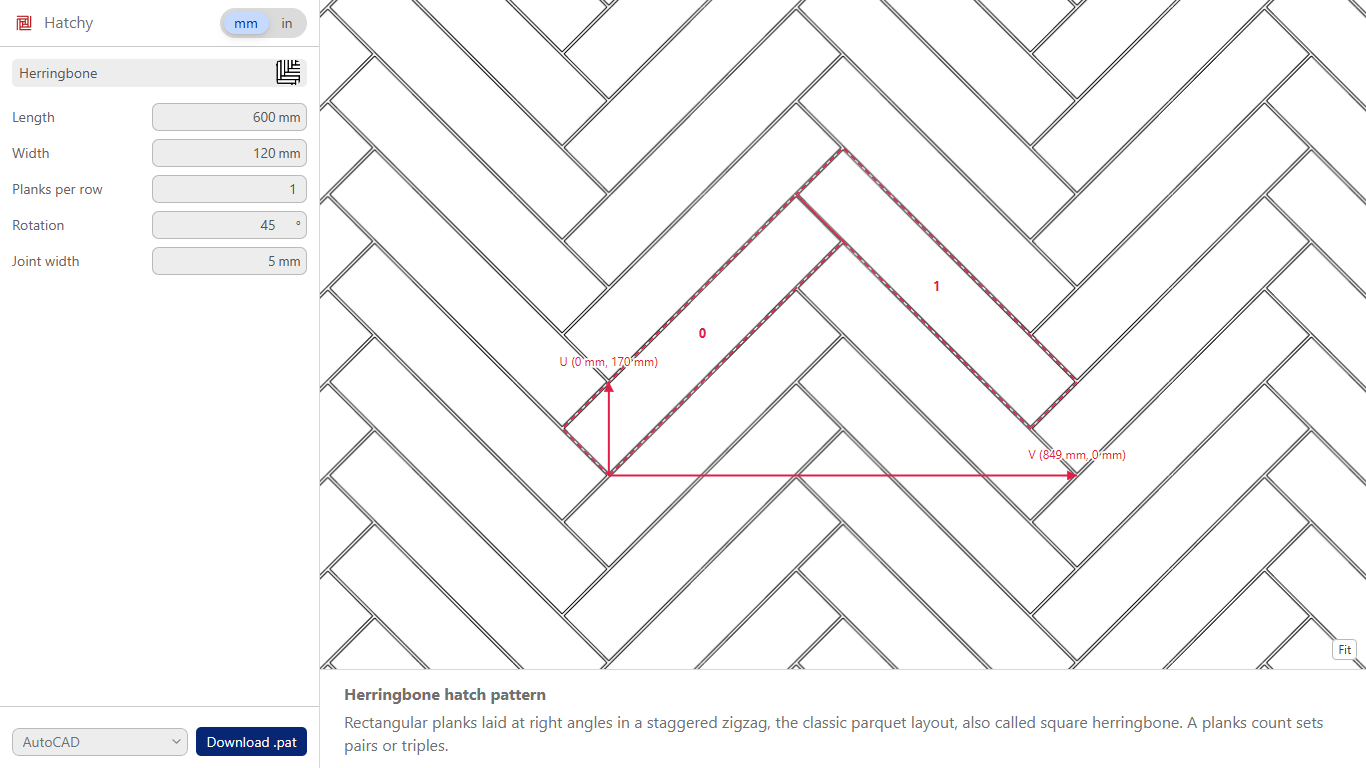


Hatchy makes AutoCAD hatch pattern (.pat) files from a library of about 1,000 parametric patterns: herringbone, running bond, basketweave, chevron, fish scale, cobblestone and more. Set the pattern’s sizes, joints and rotation, choose millimetres or inches, check the preview (it is drawn from the lines the file contains) and download the .pat file. It runs in your browser at 3dshouse.com/hatches.
Why Hatchy
- Hatchy is the largest library of parametric hatch patterns: ~1000 patterns, each with adjustable sizes.
- A preview that is the file. What you see is drawn from the lines the .pat contains, so it shows the lines the file describes.
- A joint of 0 draws one line along each joint, the plain outline of the tiles; a joint shared by two tiles is one line, not two. Above 0 Hatchy draws both edges of the joint.
- A .pat file is built from straight lines that repeat, so a curve, such as the arcs of a fish scale, is drawn as straight chords. Arc segments is shown for a pattern that has an arc: more segments follow the curve more closely and make the file larger.
- The numbers in the file are in the unit you picked, and the first line of the file records it as a comment.
Free: limited to 3 downloads a day
Pro: unlimited, guaranteed to work, priority support
14-day money-back


