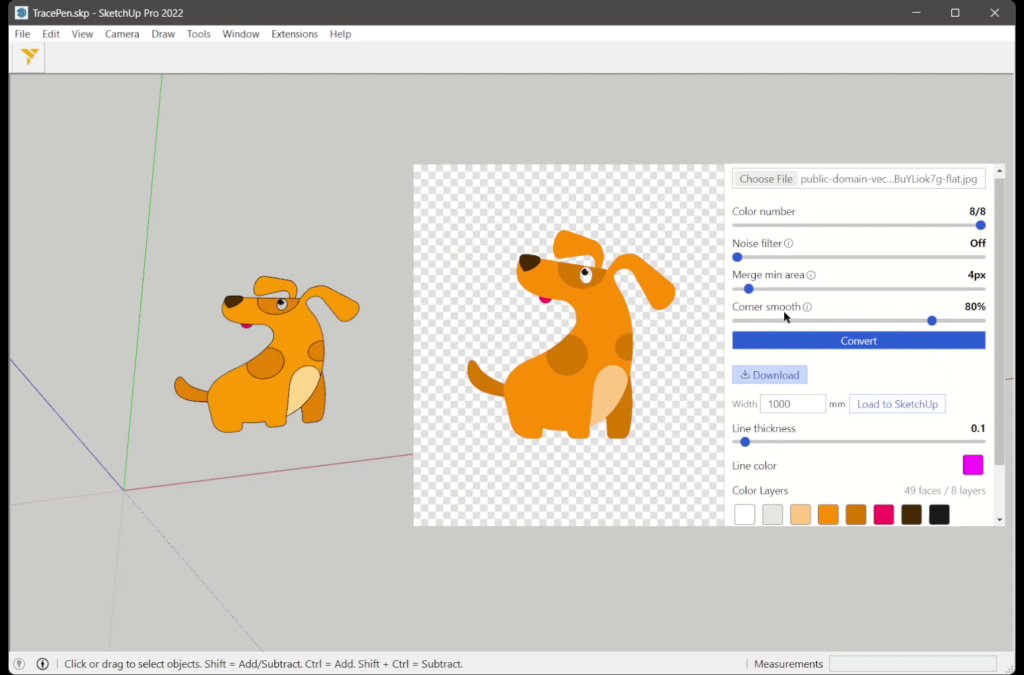
Tracepen traces a picture (PNG, JPG, WebP, GIF or BMP, up to 50 MB) into native SketchUp faces in SketchUp 2022 or newer. Pick the image, enter the Width in your model’s units and press “Load to SketchUp”: every colour becomes its own group with its own material, ready to Push/Pull.
Why Tracepen
- Many colours, each one exact: Tracepen finds every colour in the image, so a five-colour logo comes back as five groups, not one silhouette.
- Colours meet exactly: neighbouring colours share one boundary, with no gaps or overlaps to patch before Push/Pull.
- Holes stay holes: the inside of an O, an A or a ring stays open.
- No transparent PNG needed: a JPG on a white background works; untick the background colour before loading.
- Reloading replaces: loading the same image again refills the component it made before instead of adding a copy.
- Other SketchUp image plugins trace one shape from transparency, a colour filter or brightness. Tracepen is the only one that traces every colour of the image exactly.
Install
Installation and usage: Tracepen for SketchUp. The same Pro also unlocks Tracepen in its other apps on your 3dshouse account.
Free: limited to 3 exports a day
Pro: unlimited, guaranteed to work, priority support
14-day money-back